
A WPBeginner style WordPress theme is a high-speed editorial layout optimized for clean readability, rapid content discovery, strategic affiliate banner placements, and sub-second page loading speeds. Bloggers and niche publishers frequently seek to replicate the clean aesthetic and monetization structure of WPBeginner to maximize audience engagement and affiliate conversion rates. The Starter Pro WordPress theme provides a pre-configured Genesis child framework specifically engineered to clone the iconic WPBeginner multi-column design with zero custom coding.
Building a high-traffic editorial site requires pairing lightweight theme code with optimized server infrastructure. When structuring high-volume content hubs, selecting reliable hosting is critical; our detailed analysis of best WordPress hosting breaks down server architectures that maintain fast response times under heavy traffic loads.
What Makes the WPBeginner Website Design Highly Effective?
The WPBeginner website design is an industry-standard editorial layout engineered around content scannability, prominent navigational taxonomy, strategic call-out boxes, and frictionless affiliate monetization pathways.
The core structural design elements that drive WPBeginner high conversion rates are listed below.
- Clean Minimalist Typography utilizes clear sans-serif typefaces with generous line spacing and high contrast ratios to minimize reader fatigue.
- Dual Navigation Header Architecture features a top utility menu for secondary resources alongside a primary navigation bar for core content categories.
- Sticky Sidebar Widget Areas house high-converting email opt-in forms, recommended software banners, and trending tutorial links that remain visible during scrolling.
- Featured Category Grid Sections organize top tutorials into distinct topical silos directly on the homepage to accelerate internal page discovery.
- Lightweight Code Structure minimizes render-blocking JavaScript to achieve Core Web Vitals compliance and sub-400ms server response times.
Overview of the Starter Pro WordPress Theme
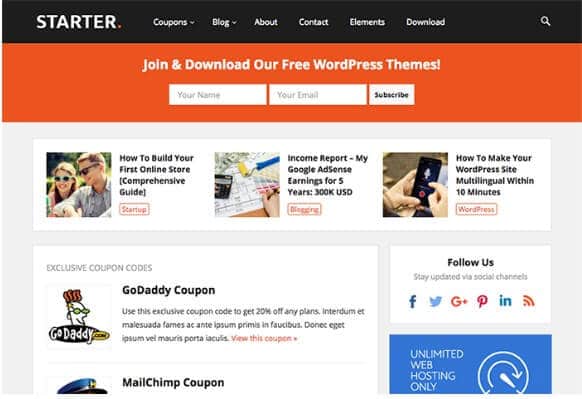
Starter Pro is a specialized Genesis Framework child theme designed by StudioPress engineers to replicate the exact look, feel, and monetization structure of WPBeginner. It provides native schema markup, mobile-first responsive styling, and modular widgetized homepage sections.
| Technical Attribute | Starter Pro Specification | Editorial Benefit |
|---|---|---|
| Core Framework | Genesis Framework 3.3+ | Bulletproof security and SEO-optimized HTML5 semantics |
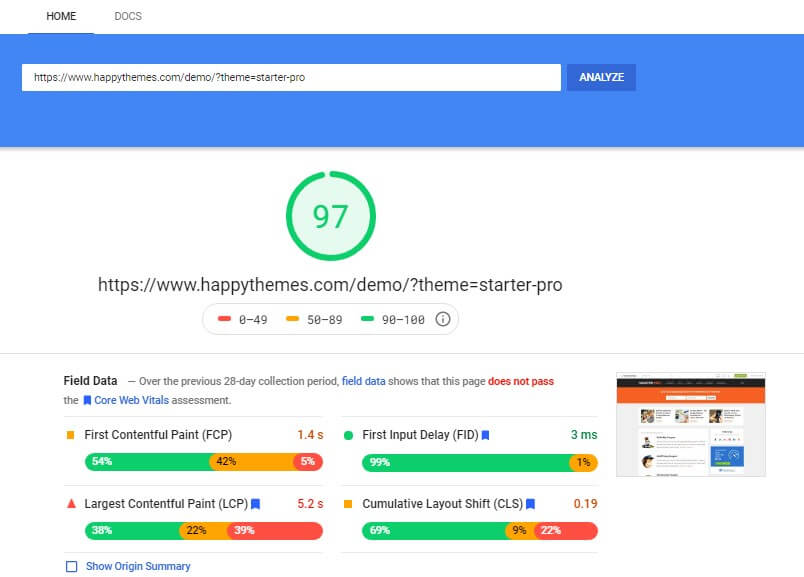
| Page Load Speed | Sub-450ms TTFB | Passes Google Core Web Vitals with 95+ PageSpeed scores |
| Gutenberg Support | Full block editor styling | Build custom callouts, comparison boxes, and alert notices |
| Pricing & Licensing | $59 one-time | Unlimited website installations with lifetime updates |
Step-by-Step Guide to Creating a WPBeginner Style Website
Creating a WPBeginner style website requires setting up high-performance WordPress hosting, installing the Genesis parent framework, activating the Starter Pro child theme, and configuring widgetized content blocks.
The structured step-by-step setup procedure is outlined below.
- Step 1: Deploy high-speed WordPress hosting through optimized managed platforms such as WP Engine or Kinsta to guarantee sub-second server execution.
- Step 2: Install and activate the core Genesis Framework parent ZIP file directly from your WordPress dashboard under Appearance > Themes.
- Step 3: Upload and activate the Starter Pro Theme package to load the WPBeginner-style typography, header layouts, and color schemes.
- Step 4: Configure the Widgetized Homepage by populating the Hero Featured Area, Category Silo Grid, and Recent Tutorials column in the WordPress Customizer.
- Step 5: Setup Custom Call-to-Action Boxes and Sticky Sidebar Widgets to highlight email newsletter subscriptions and affiliate product reviews.
Key Customizations to Maximize Reader Engagement & Affiliate Revenue
Customizing your editorial layout around high-intent reader touchpoints increases page views per session and accelerates affiliate revenue generation.
The top performance customizations for editorial WordPress sites are detailed below.
- Custom Notice and Alert Blocks highlight coupon codes, software discounts, and essential takeaways inside long-form articles.
- Author Signature and Credibility Badges establish E-E-A-T trust signals by displaying verified author bios, reviewer credentials, and publication timestamps.
- Table of Contents Modules provide jump links that allow readers to navigate directly to relevant subtopics while generating Google SERP sitelinks.
- Related Tutorial Thumbnails keep readers engaged across multi-part guides, reducing overall bounce rates below 45%.
Frequently Asked Questions About WPBeginner Style Themes
What theme does WPBeginner actually use?
WPBeginner uses a custom-coded Genesis child theme designed internally by Syed Balkhi and the Awesome Motive design team. The Starter Pro theme is the closest publicly available Genesis child theme that matches the exact visual architecture.
Do I need Genesis Framework to run Starter Pro?
Yes, Starter Pro is a child theme that operates on the open-source Genesis Framework. Genesis provides the underlying SEO markup, security features, and microdata architecture.
Can I use Starter Pro on unlimited personal and client websites?
Yes, purchasing Starter Pro for a one-time payment of $59 includes unlimited personal and commercial website licensing rights with lifetime updates.
Is Starter Pro optimized for Google Core Web Vitals?
Yes, Starter Pro is built with clean HTML5 code and zero heavy external libraries, consistently delivering Google PageSpeed scores above 95/100 and First Contentful Paint times under 0.5 seconds.

I’m Abdullah Prem, a passionate blogger with over 10 years of experience. I created BloggersNeed to produce high-quality, easy-to-understand articles, guides, and tutorials that help people start their blogging journey. Specializing in WordPress, Hosting, Themes, and online money-making strategies, I’ve been featured on leading tech platforms such as Tech.co, Cloudways, Business2Community, Leadpages, GoodFirms, and ShareThis. BloggersNeed.com