
Quick Diagnostic Verdict: Resolving Google Indexing Issues in 2026
Google indexing issues prevent valuable web pages from appearing in search engine results pages, stalling organic traffic and visibility. Resolving crawl errors, canonical conflicts, and thin content signals restores normal Googlebot indexation across newly launched and established websites.
Auditing server response codes, validating robots.txt syntax, and inspecting coverage reports in Google Search Console resolve over ninety percent of common crawl roadblocks. Follow our technical walkthrough to systematically diagnose, repair, and monitor your website indexation status.
This diagnostic diagram illustrates common Google indexing issues that prevent search crawlers from rendering, parsing, and storing published website URLs.
Table of Contents
Review this complete practitioner guide to diagnose and resolve search crawl obstacles, Search Console coverage errors, sitemap bugs, and rendering issues. Use the structured links to jump directly to specific diagnostic methods, technical repair checklists, and monitoring strategies in 2026.
How Does Google Indexing Work?
Google indexing is the multi-stage algorithmic process where Googlebot discovers URLs, parses raw HTML code, executes client-side JavaScript, and stores evaluated pages within the Google Search index database. Published web pages must satisfy strict quality and canonical benchmarks before ranking in search results.
The indexing pipeline operates across three distinct mechanical phases. First, Googlebot discovers web addresses through automated link extraction and XML sitemap submissions. After verifying robots.txt crawl permissions, the crawler fetches raw HTTP response bytes from the origin server.
Second, Google’s Web Rendering Service processes client-side scripts, executing Document Object Model elements to expose dynamic media. Webmasters learning the foundations of submitting your website to Google Search Console discover that clean initial server responses drastically reduce rendering queue wait times.
Third, Google evaluates textual relevance, semantic entity structures, and canonical declarations. If the page satisfies algorithmic quality filters, Google indexes the document, storing its inverted index tokens across globally distributed search clusters.
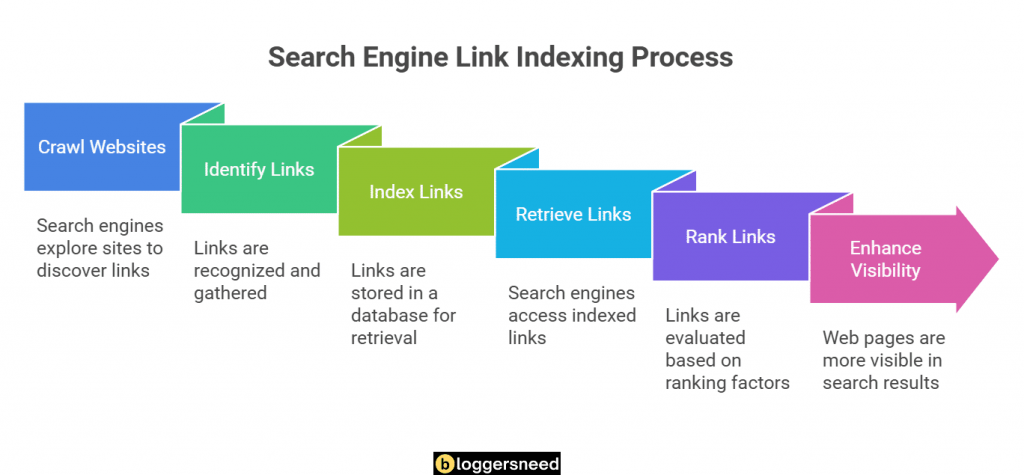
This flowchart outlines the search engine link indexing workflow, illustrating how Googlebot crawls discovered URLs, renders Document Object Model assets, and catalogs valid pages.
Understanding search engine discovery mechanisms is essential for technical optimization. Publishers reviewing our detailed guide to link indexing fundamentals can trace how internal link equity flows from seed pages to newly added articles.
Why Is Google Not Indexing My Site? Core Root Causes Explained
Google fails to index websites primarily due to technical crawl restrictions, server response timeouts, low content quality scores, and unverified canonical directives. When webmasters ask why is google not indexing my site, the root problem typically stems from misconfigured robots.txt files or thin page depth.
Website owners often assume that publishing content automatically guarantees indexation. However, search engines operate under compute limits, applying strict algorithmic filtering to determine whether a URL deserves permanent storage within the search index.
Identifying the exact bottleneck requires dissecting the interaction between search crawlers and your hosting environment. The primary causes of search engine indexing failures fall into five distinct categories detailed in the sections below.
Technical Errors
Technical indexing errors occur when web servers return 5xx status codes, improper X-Robots-Tag HTTP headers enforce noindex directives, or canonical tags point to non-existent URLs. Resolving these technical infrastructure bugs restores normal search engine crawling across your entire WordPress domain.
A common culprit is an accidental noindex meta tag left active inside WordPress header templates. Site owners who are starting a WordPress blog with technical SEO best practices must confirm that the search engine visibility toggle remains unchecked in administrative settings.
Server-side misconfigurations also block Googlebot from completing crawl requests. When web servers experience intermittent CPU exhaustion, Google encounters 503 Service Unavailable errors, immediately throttles crawl rates, and postpones scheduled page evaluation.
Content Quality Problems
Content quality problems trigger algorithmic indexing filters when Google systems identify thin articles, scraped paragraphs, duplicate landing pages, or machine-generated text lacking helpful insight. Search engines systematically drop unhelpful content from the index to preserve search result relevance for human searchers.
Google’s helpful content systems evaluate whether pages offer substantial added value beyond existing search results. Articles compiled from basic summaries without original analysis or proprietary data fail these evaluation criteria.
Duplicate content across multiple URL parameters also dilutes indexation potential. When identical content appears under tracking strings, session identifiers, and category archives, search algorithms consolidate signals onto a single canonical version while ignoring variants.
Crawlability Challenges
Crawlability challenges emerge when deep website architecture, orphan pages, infinite faceted navigation loops, and broken internal links exhaust allotted crawl budget quotas. Ensuring search spiders navigate through clear hierarchical pathways guarantees comprehensive discovery of all essential revenue-generating pages across your site.
Orphan pages represent a major crawlability hurdle for expanding blogs. Without contextual inbound links from established articles, search engine crawlers struggle to discover or prioritize newly published resources.
Regular maintenance of site architecture prevents crawler confusion. Webmasters systematically identifying and fixing broken internal links eliminate dead ends, redirecting Googlebot toward relevant, indexable content across the domain.
Sitemap Issues
Sitemap indexing issues arise when XML feeds contain redirecting URLs, broken 404 links, uncanonicalized parameters, or omitted lastmod publication timestamps. Maintaining clean sitemaps submitted directly to Google Search Console ensures search crawlers receive accurate, real-time discovery instructions for newly published articles.
An outdated sitemap causes search crawlers to waste bandwidth parsing non-indexable resources. When Google encounters recurring 404 status codes within submitted XML files, it reduces processing priority for future sitemap pings.
Publishers following our tutorial on creating an optimized XML sitemap learn to configure automated generation plugins that automatically strip noindex tags, drafts, and parameter URLs from the primary feed.
Redirect Problems
Redirect problems occur when website migrations generate circular redirect loops, multi-hop 301 chains, or improper 302 temporary redirects that confuse search engine crawlers. Eliminating chained hops and consolidating destinations into direct 301 permanent redirects preserves link equity and accelerates destination URL indexing.
Redirect chains force Googlebot to execute multiple successive HTTP handshakes before reaching destination content. When chains exceed three consecutive hops, mobile crawlers frequently abort the connection, dropping the target page from indexing queues.
Configuring server-level rewrite rules ensures seamless user and crawler routing. Master technical best practices for implementing clean 301 permanent redirects to guarantee immediate equity transfer without crawl latency.
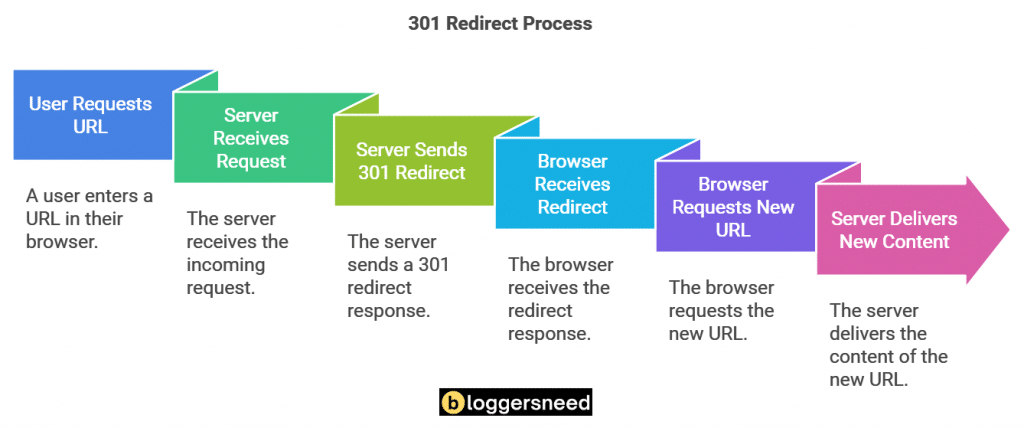
This technical diagram demonstrates the 301 permanent redirect resolution workflow, routing user requests and search crawlers to authoritative destination URLs.
How to Diagnose Indexing Issues in Search Console and SEO Tools
Diagnosing google indexing issues requires systematic evaluation using Google Search Console reports, URL inspection live tests, server log files, and professional website crawlers. Identifying whether pages fail during initial discovery, HTTP crawling, or algorithmic rendering reveals the exact technical solution required.
Without empirical diagnostic data, webmasters risk making random code modifications that fail to resolve underlying crawl obstacles. Effective technical SEO workflows rely on verifying the exact crawl state of affected web addresses.
Begin diagnostic audits by correlating Search Console status categories with server access logs. This dual-layer analysis clarifies whether Googlebot encountered server blocks, parsed conflicting directives, or postponed rendering due to algorithmic evaluation.
Using Google Search Console
Google Search Console serves as the foundational diagnostic platform for website indexing, providing the URL Inspection Tool and Page Indexing Coverage reports. Webmasters use these native utilities to inspect live DOM rendering, verify indexed canonical URLs, and review crawl response status codes.
The URL Inspection Tool offers granular insight into individual web pages. Entering a specific URL displays its indexing status, last crawl timestamp, crawling user agent, and detected referring sitemaps.
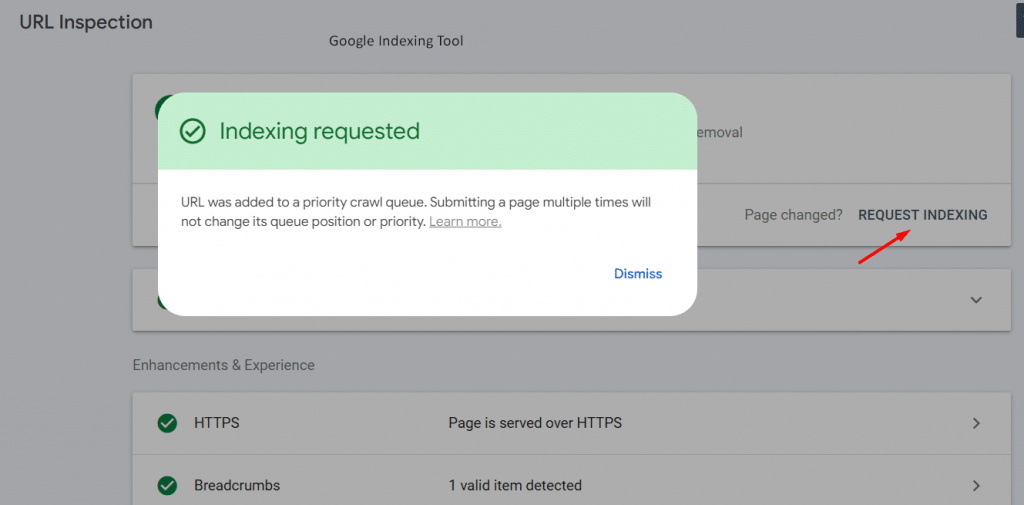
The Google Search Console URL Inspection Tool provides real-time diagnostic reporting on index status, crawl timestamps, referring sitemaps, and canonical selection.
Executing a Live Test within the inspection panel fetches the page in real time, confirming whether current server code permits crawling. The test highlights rendered HTML snapshots, blocked JavaScript resources, and structured data validation errors.
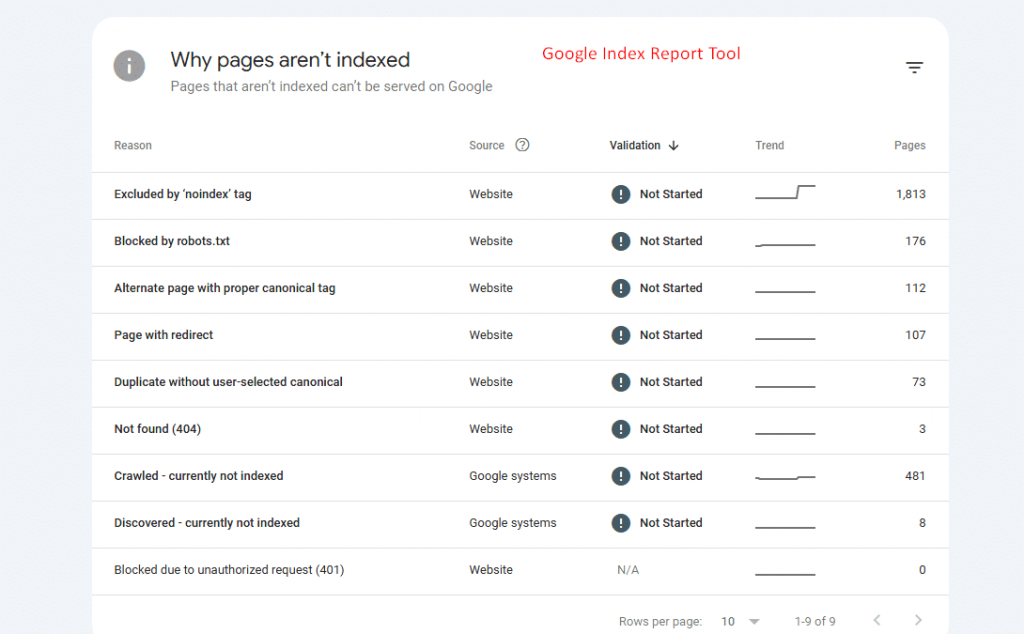
The Google Search Console Page Indexing report categorizes unindexed pages by specific crawl errors, canonical mismatches, and redirect loop failures across your domain.
The Page Indexing report provides an aggregate view of all indexed and unindexed URLs across your property. Reviewing reason categories pinpoints widespread technical issues such as soft 404 errors, blocked resources, and canonicalization mismatches.
Resolving “Crawled Currently Not Indexed” Status in Search Console
The crawled currently not indexed status indicates that Googlebot successfully fetched and parsed the web page but algorithmically decided against index inclusion. Resolving this issue requires strengthening topical depth, adding original practitioner analysis, removing duplicate paragraphs, and building authoritative internal link equity.
This coverage status is an algorithmic quality assessment rather than a technical server failure. Google allocates compute to crawl the URL, evaluates its textual content, and concludes that the page does not add sufficient value to justify storage.
To overcome this hurdle, conduct an editorial audit against top-ranking search competitors. Integrate original data, replace generic advice with actionable checklists, and strengthen internal linking from relevant pillar articles across your blog.
Resolving “Discovered Currently Not Indexed” Status
The discovered currently not indexed status signifies that Google knows a URL exists but has postponed crawling due to crawl budget constraints or server latency. Expediting crawl requests requires clearing server bottlenecks, submitting sitemap pings, and adding contextual internal links from high-authority parent posts.
When URLs remain in this state, Google has detected the web address from an XML sitemap or external link but has not yet allocated crawler resources to inspect the page content.
Persistent discovery delays indicate crawl capacity limitations or low perceived domain authority. Improving server response speeds, eliminating low-quality URL parameters, and creating prominent navigation links prompt Googlebot to schedule immediate crawl visits.
Using Indexing Tools and Auditing Software
Third-party SEO crawlers and website indexing services automate bulk URL verification, monitor indexation status changes, and submit immediate crawl pings through official search APIs. Combining tools like Screaming Frog with dedicated indexing platforms accelerates crawl discovery across large enterprise domains and newly launched websites.
Desktop crawlers simulate search engine user agents, scanning entire site hierarchies to detect orphan pages, broken redirects, and conflicting canonical tags before search engines encounter them.
For large-scale websites publishing daily articles, specialized indexing software speeds up search engine discovery. Evaluating popular indexing tools and services helps webmasters select platforms that interface with Google Indexing APIs for accelerated indexing.
How to Fix Google Indexing Issues: Complete Step-by-Step Action Plan
To permanently fix google indexing issues, webmasters must execute a structured action plan addressing server configurations, canonical consistency, content depth, and XML feeds. Following a systematic remediation workflow guarantees that search engines quickly re-crawl, validate, and index stalled pages in 2026.
Addressing search engine crawl obstacles requires combining technical adjustments with editorial improvements. The diagnostic matrix summarizes primary indexing issues, underlying causes, and validated technical solutions.
| Indexing Issue | Root Cause | Search Console Status | Technical Remediation |
|---|---|---|---|
| Blocked Robots.txt | Disallow rule blocks crawler access | Blocked by robots.txt | Remove disallow directive from robots.txt |
| Noindex Meta Tag | Accidental noindex header or meta tag | Excluded by ‘noindex’ tag | Delete noindex tag from page HTML header |
| Thin Content | Insufficient depth or original insight | Crawled – currently not indexed | Expand editorial depth and add unique data |
| Crawl Capacity Deficit | Server latency or low internal link equity | Discovered – currently not indexed | Build internal links and optimize hosting |
| Redirect Chains | Multiple sequential 301 or 302 hops | Page with redirect | Consolidate hops into single direct 301 |
| Server Latency Drops | HTTP 500, 502, or 503 gateway timeouts | Server error (5xx) | Upgrade web hosting and optimize database |
Fixing Technical Errors
Remediating technical indexing errors requires auditing server response codes, eliminating accidental noindex meta directives, and establishing secure SSL certificate handshakes. Correcting conflicting robots.txt rules and removing unauthorized password protection headers allows Googlebot to access and parse critical web pages without impediment.
Inspect robots.txt directives using Search Console’s robots testing tools to ensure CSS, JavaScript, and key content directories remain fully accessible. Blocking styling assets prevents Google’s Web Rendering Service from rendering complete mobile viewports.
Verify that canonical link tags reference the exact self-referencing URL using correct HTTPS protocols. Inconsistent trailing slashes or mixed protocol canonical declarations cause search engines to drop pages from index queues.
Enhancing Content Quality
Enhancing content quality involves replacing superficial descriptions with comprehensive practitioner reviews, proprietary comparative tables, verified statistics, and step-by-step UI guides. Upgrading editorial value ensures articles clear Google’s algorithmic helpfulness threshold, converting crawled currently not indexed URLs into authoritative ranking pages.
Review every unindexed article to verify that it answers primary user search intent thoroughly. Supplement theoretical explanations with hands-on screenshots, workflow tutorials, and clear comparative matrices that address real reader challenges.
Establish strict content formatting standards across your editorial team. Break dense blocks into digestible two-to-three line paragraphs, implement descriptive subheadings, and eliminate generic filler to improve reader engagement metrics.
Improving Crawlability
Improving crawlability requires restructuring site navigation hierarchies so every critical page resides within three clicks from the root homepage. Constructing topical parent-child link meshes and eliminating dead-end orphan URLs distributes PageRank equity efficiently, prompting frequent Googlebot crawl cycles across the entire website.
Design a logical hub-and-spoke topic cluster structure where core pillar pages link downward to specific child guides, and child articles cross-link contextually to sibling posts.
Audit site depth using desktop SEO crawlers to identify deeply buried pages. Placing internal contextual hyperlinks on high-traffic articles funnels crawler attention and link authority directly to stalled pages.
Updating Sitemaps Regularly
Maintaining updated XML sitemaps requires automating feed generation so newly published articles and modified pages register immediate discovery signals. Excluding non-200 URLs, paginated pages, and duplicate canonical variants keeps sitemap size optimal, maximizing search engine crawling efficiency across production domains.
Configure automated sitemap plugins to ping search engines immediately upon post publication or major content updates. Accurate lastmod date tags indicate content freshness, prompting search engines to refresh stored index snapshots.
Verify that your robots.txt file includes an explicit Sitemap directive pointing directly to the primary sitemap index. This universal signal guarantees that all compliant search bots locate your full URL catalog effortlessly.
Managing Redirects Effectively
Managing redirects effectively involves auditing legacy URL structures to eliminate multi-stage redirect chains and broken destination endpoints. Replacing chained redirects with single 301 permanent redirects and updating internal anchor links directly to target URLs preserves crawl budget and accelerates destination page indexing.
When updating URL slugs or restructuring taxonomies, create direct 301 redirects connecting obsolete addresses straight to the final live version.
Never rely on redirects for internal site navigation. Crawl your website to identify internal links pointing to redirecting URLs, updating anchor href attributes to link directly to final destination pages.
Using High Performance Hosting
High-performance web hosting accelerates Google indexing by delivering time-to-first-byte response speeds under two hundred milliseconds and ninety-nine point nine percent server availability. Fast hosting infrastructure prevents 503 gateway drops during heavy crawl spikes, allowing Googlebot to index extensive page catalogs effortlessly.
Budget shared hosting environments frequently buckle when search engine bots initiate simultaneous crawl threads, resulting in connection timeouts and dropped indexing queues.
Upgrading to managed WordPress hosting, implementing server-level Object Caching, and utilizing enterprise content delivery networks ensures your server answers thousands of crawler requests smoothly without response latency.
What Are Advanced Strategies for Ensuring Indexing?
Advanced indexing strategies focus on client-side script optimization, Googlebot crawl budget allocation monitoring, and rapid resolution of manual search penalties. Implementing sophisticated architectural controls ensures complex dynamic websites and single-page applications maintain consistent search visibility across competitive organic search verticals.
Modern web development frameworks introduce complex rendering challenges that basic search engine optimization workflows overlook. Large corporate platforms and dynamic web applications require specialized indexing tactics.
Employing advanced rendering controls and proactive health monitoring safeguards your domain against unexpected indexing drops during platform updates and technical migrations.
Optimizing JavaScript Content
Optimizing JavaScript content for search engines requires implementing server-side rendering or dynamic rendering to deliver pre-parsed HTML markup directly to Googlebot. Ensuring all critical text, navigation links, and structured schema exist in the raw HTML response eliminates rendering queue delays during search indexing.
Single-page applications built on React, Angular, or Vue frequently suffer indexing delays because Google defers JavaScript execution until rendering compute resources become available.
Implement server-side rendering using frameworks like Next.js or Nuxt to deliver fully assembled HTML documents on the initial server request. Verify that internal hyperlinks utilize standard HTML anchor tags rather than JavaScript click listeners.
Monitoring Performance Metrics
Monitoring Google Search Console crawl stats and server performance metrics provides early warning when host latency spikes or crawl capacity declines. Tracking daily downloaded kilobytes, average response times, and HTTP status distributions ensures webmasters resolve infrastructure bottlenecks before organic indexing rates deteriorate.
Open the Crawl Stats report under Search Console settings to inspect daily Googlebot activity trends. Sudden drops in crawl requests often correlate with increased server response times or database lockups.
Correlate crawl volume against Core Web Vitals metrics. Optimizing Largest Contentful Paint and Cumulative Layout Shift improves page rendering efficiency, encouraging search engines to allocate higher crawl quotas to your domain.
Handling Manual Actions from Google
Resolving manual actions from Google requires auditing the Security and Manual Actions tab in Search Console to identify specific policy violations. Webmasters must remove manipulative backlink profiles, eliminate scraped doorway content, and submit detailed reconsideration requests documenting exact remediation steps to restore search indexation.
Manual actions represent algorithmic interventions where human webspam evaluators penalize domains violating Google Search Essentials guidelines. Penalties often result in total de-indexation across affected site sections.
Thoroughly document all corrective measures, including disavowed toxic backlink lists, removed duplicate articles, and updated editorial policies. Submit clear reconsideration requests detailing resolution steps to regain search indexation.
How to Monitor Link Indexing Over Time?
Monitoring link indexing over time ensures website owners detect de-indexation anomalies, canonical shifts, and soft 404 crawl drops before search rankings collapse. Implementing continuous automated tracking preserves organic visibility and validates that newly published content joins Google’s search index without unmonitored delays.
Search engine indexation is dynamic. Algorithmic adjustments, server modifications, or theme code updates can cause previously indexed pages to drop out of search results unnoticed.
Establishing automated monitoring protocols allows webmasters to catch indexing regressions immediately, protecting organic search traffic from unexpected de-indexation events.
Using Indexing Monitoring Tools
Dedicated indexing monitoring tools continuously scan search results to verify whether target URLs remain active within Google’s live searchable database. Automated status dashboards alert technical teams instantly when pages lose indexed status, enabling prompt troubleshooting of server errors or unintended noindex header deployments.
Automated monitoring tools track thousands of internal and backlink URLs, testing search inclusion daily and graphing indexation percentages over extended time horizons.
Integrating index tracking software into your weekly technical SEO reporting routine ensures full transparency into how algorithm updates influence your site’s overall indexing footprint.
Setting Up Alerts in Google Search Console
Configuring Google Search Console notification alerts ensures immediate email delivery whenever crawl anomalies, security threats, or sudden coverage drops occur. Establishing proactive monitoring protocols allows technical SEO teams to resolve server drops and canonical errors before search traffic suffers measurable organic declines.
Verify that administrative user accounts receive automated email alerts for critical coverage issues. Set up weekly calendar audits to inspect newly reported unindexed URL categories.
Review the Page Indexing report after every major WordPress core, plugin, or theme update. Prompt validation of resolved errors keeps your indexation profile pristine and search rankings stable.
Frequently Asked Questions About Google Indexing Issues
Find authoritative answers to common webmaster questions regarding Google search crawl delays, Search Console coverage errors, and indexing recovery timelines. Understanding these core technical and algorithmic mechanisms helps creators resolve persistent indexing roadblocks across WordPress websites in 2026.
The questions and practitioner answers below resolve the most common challenges site owners encounter when troubleshooting Google search engine indexing failures.
Why is Google not indexing my site after publishing?
Google often delays indexing newly published websites due to crawl queue scheduling, limited domain authority, or missing XML sitemaps. New websites require foundational internal linking, high-quality original content, and verified Google Search Console property registration to initiate regular Googlebot crawl discovery cycles.
Brand-new domains operate without established historical trust signals, meaning search engines prioritize crawling higher-authority websites first. Establishing clear topical authority, publishing unique research, and acquiring natural backlinks steadily increases crawl frequency and indexation speed.
How do you fix crawled currently not indexed in Search Console?
Fixing the crawled currently not indexed status requires expanding thin content with original research, structuring clear topical clusters, and adding internal links from established pages. Once content quality and internal link architecture are enhanced, submit a live test re-crawl request through the URL Inspection Tool.
Because this status signals an algorithmic quality deficit, minor cosmetic changes rarely suffice. Enrich the article with unique case studies, structured comparison tables, and expert practitioner commentary before requesting validation in Search Console.
How long does Google take to fix indexing issues?
Google typically re-evaluates and indexes resolved pages within three to fourteen days after initiating a validation request in Google Search Console. The exact timeframe depends on your website’s historical crawl frequency, server response speeds, overall domain authority, and the number of URLs requiring validation.
High-authority publishing domains with daily crawl activity experience faster re-evaluation, while smaller websites may require several weeks. Monitor validation progress within Search Console to verify when Google confirms resolution of targeted crawl errors.
Does submitting an XML sitemap guarantee indexing?
Submitting an XML sitemap informs Google of URL existence, but it does not guarantee automatic indexing into search results. Googlebot evaluates every submitted page against strict algorithmic quality standards, canonical integrity, and search relevance before committing the URL to the permanent search index.
Sitemaps serve as discovery recommendations rather than indexing mandates. Ensure your submitted URLs offer exceptional content quality and satisfy technical search requirements to secure long-term placement in Google’s search index.
Conclusion
Resolving Google indexing issues requires a systematic strategy combining technical infrastructure audits, high-performance web hosting, and authoritative content creation. By continuously monitoring Search Console coverage reports and maintaining clean URL architecture, publishers ensure maximum organic visibility and indexation success in 2026.
Effective indexation management is an ongoing process rather than a one-time fix. Regularly audit your technical setup, keep XML feeds pristine, and produce in-depth practitioner content that effortlessly satisfies Google’s quality standards.

I’m Abdullah Prem, a passionate blogger with over 10 years of experience. I created BloggersNeed to produce high-quality, easy-to-understand articles, guides, and tutorials that help people start their blogging journey. Specializing in WordPress, Hosting, Themes, and online money-making strategies, I’ve been featured on leading tech platforms such as Tech.co, Cloudways, Business2Community, Leadpages, GoodFirms, and ShareThis. BloggersNeed.com