
Emergency Remediation Protocol
The Japanese keyword hack injects unauthorized doorway pages into your server. These pages serve counterfeit product listings to Googlebot while displaying normal content to human visitors.
To clean your site, delete unauthorized PHP scripts from your root directory, purge auto-crawled Merchant Center feeds, return standard HTTP 404 or 410 headers, and block script execution in your uploads folder.
- Attack Vector: Vulnerable plugins, outdated themes, and unhardened media directories.
- Primary Symptom: Thousands of indexed Japanese search results displaying counterfeit luxury goods.
- Merchant Center Impact: Automated website crawl feeds scraping fake product schema.
- Remediation Timeline: Server cleanup takes 30 minutes; Google search index de-indexing requires 2 to 6 weeks.
Discovering thousands of spammy Japanese search results pointing to your WordPress site can feel alarming. At BloggersNeed, our technical team has cleaned dozens of compromised enterprise and small-business sites hit by this exact SEO spam injection.
This automated attack targets vulnerable WordPress installations. It injects doorway files into your server root and creates fake product pages that only Googlebot can view while human visitors see your normal website.
In this guide, we share our field-tested cleanup blueprint. You will learn how to identify malicious scripts, purge contaminated Google Merchant Center feeds, harden your hosting environment, and force search engines to de-index spam URLs.
What Is the Japanese Keyword Hack in WordPress?
The Japanese keyword hack is an automated SEO spam injection targeting WordPress servers. Attackers inject rogue PHP doorway files and fraudulent XML sitemaps to rank thousands of auto-generated pages for counterfeit goods on search engines.
This attack relies on conditional cloaking. The injected malware inspects the incoming visitor HTTP request headers to determine whether the visitor is an automated search engine crawler or a human user.
If the HTTP User-Agent matches Googlebot or Bingbot, the script returns Japanese text packed with internal links to counterfeit e-commerce stores. When a human visits that same URL directly, the server returns an HTTP 404 error.
This selective cloaking cloaks the infection from webmasters for months. Because your normal website appears unchanged, the hack often goes unnoticed until search traffic declines or warning notices arrive.
Beyond organic search results, this exploit severely impacts e-commerce tools. If your domain is connected to Google Merchant Center, Google’s automated website crawler scrapes the fake product schema, flooding your merchant account with counterfeit listings.
Symptoms and Detection: How to Confirm an Infection
To detect an active infection, run a site: operator search on Google, review coverage spikes in Google Search Console, and inspect Google Merchant Center for auto-generated Japanese product listings.
At BloggersNeed, our security team always begins an audit with a targeted Google search. Open a private browsing session and query your domain using the following search string.
site:yourdomain.com japan
If your installation is compromised, Google search results will display dozens or hundreds of Japanese titles mentioning luxury apparel, counterfeit handbags, or sports shoes alongside your actual domain name.
Google Search Console Indexing Spikes
Google Search Console reveals Japanese hack infections through massive spikes in Not found (404) and Discovered currently not indexed pages inside your Page Indexing dashboard.
Attackers upload rogue XML sitemaps with randomized file names like sitemap_index.xml.bak or jp-sitemap.xml. These sitemaps submit thousands of counterfeit doorway URLs directly to search crawlers.
If your legitimate articles get delayed in crawl queues alongside spam, check our guide on how to fix Discovered – currently not indexed in Google Search Console to restore crawler bandwidth.
The Search Console Page Indexing dashboard shows clear crawl surges caused by these injected doorway pages.
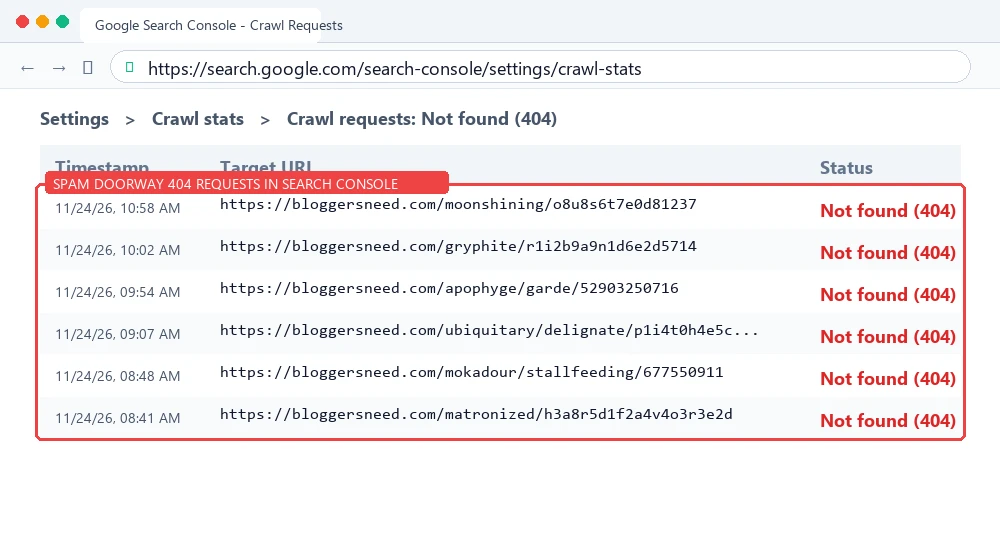
Seeing a high volume of 404 errors in Search Console is not harmful to your domain authority. It confirms that Googlebot is attempting to verify deleted spam URLs and will gradually remove them from the index.
Automated Products in Google Merchant Center
Google Merchant Center accounts become contaminated when Google’s automated website crawl feed detects and scrapes counterfeit Schema.org Product microdata from injected doorway pages on your site.
Many publishers are shocked to discover hundreds of Japanese products in Merchant Center without ever running an e-commerce shop. This happens because Google Merchant Center features an automatic discovery tool called Website Crawl.
When enabled, Googlebot scans your pages for structured product markup. Because the malicious scripts present product schema exclusively to Googlebot, Google syncs those counterfeit products directly into your merchant feed.
Left unaddressed, this automated scraping triggers account warnings for counterfeit items and misrepresentation. Cleaning the infected files on your server is critical before removing the feed inside Google Merchant Center.
Step 1: Identifying and Deleting Malicious Doorway Files
To eliminate doorway scripts, log in via cPanel File Manager or SFTP and delete all unauthorized PHP files from your root public_html directory. Purge fake XML sitemaps, inspect your .htaccess file, and verify core checksums.
Attackers behind the Japanese keyword hack install redundant backdoors across your server. This ensures they can regain access if a webmaster deletes only the visible spam files.
Access your web hosting control panel and open cPanel File Manager or connect via SFTP. Navigate directly to your primary document root, typically named public_html.
Examine the directory for non-standard PHP files located alongside legitimate core files like index.php and wp-config.php. Look for randomized filenames such as db76.php, ext.php, or wp-login.php.bak.
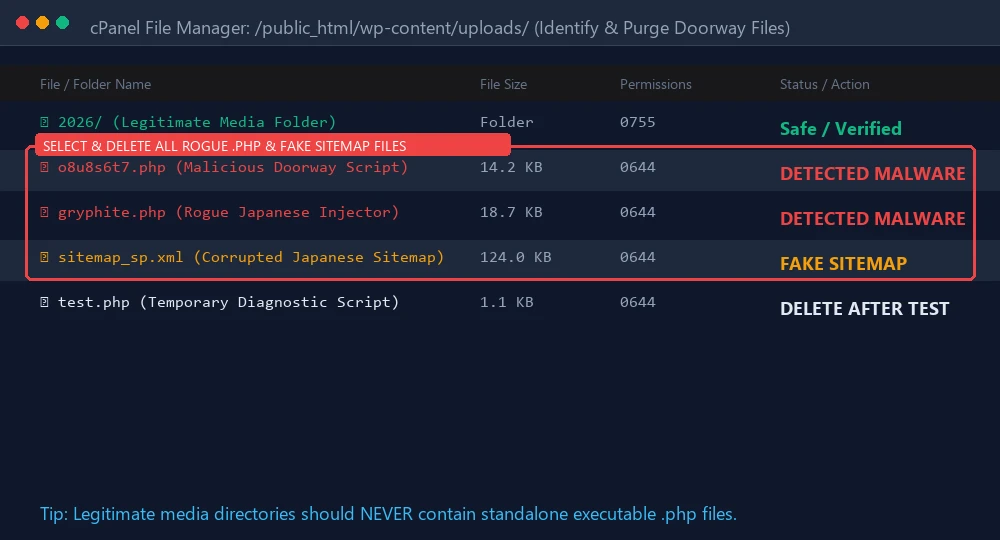
Select these unauthorized files and delete them permanently. Next, open your root .htaccess file to confirm attackers have not added rewrite rules that conditionally redirect search bot requests.
A clean default WordPress .htaccess file contains only standard rewrite directives.
# BEGIN WordPress
RewriteEngine On
RewriteRule .* - [E=HTTP_AUTHORIZATION:%{HTTP:Authorization}]
RewriteBase /
RewriteRule ^index\.php$ - [L]
RewriteCond %{REQUEST_FILENAME} !-f
RewriteCond %{REQUEST_FILENAME} !-d
RewriteRule . /index.php [L]
# END WordPress
If you have SSH terminal access to your web hosting account, verify your core files using WP-CLI. Execute this command to check for modified core files.
wp core verify-checksums
Next, verify your installed plugins with WP-CLI to ensure no plugin code contains base64-encoded web shells.
wp plugin verify-checksums
Finally, navigate to your WordPress administration dashboard under Users and review all registered accounts. Attackers frequently create rogue administrator accounts using temporary email domains. Delete any unverified administrator profiles immediately.
Step 2: Purging the Automated Feed in Google Merchant Center
To clear counterfeit items from Google Merchant Center, open Data Sources under Settings, locate the Website Crawl feed, and select Stop Managing Products to purge all scraped Japanese products.
After sanitizing your server files, you must stop Google Merchant Center from serving the cached spam products. If you leave the feed active, the spam items can linger in Google Shopping for weeks.
Log in to your Google Merchant Center account. In the left navigation menu, click on the Settings gear icon and select Data Sources.
Locate the data source labeled Website Crawl. This feed is created automatically by Googlebot and is completely separate from any manual product spreadsheets you maintain.
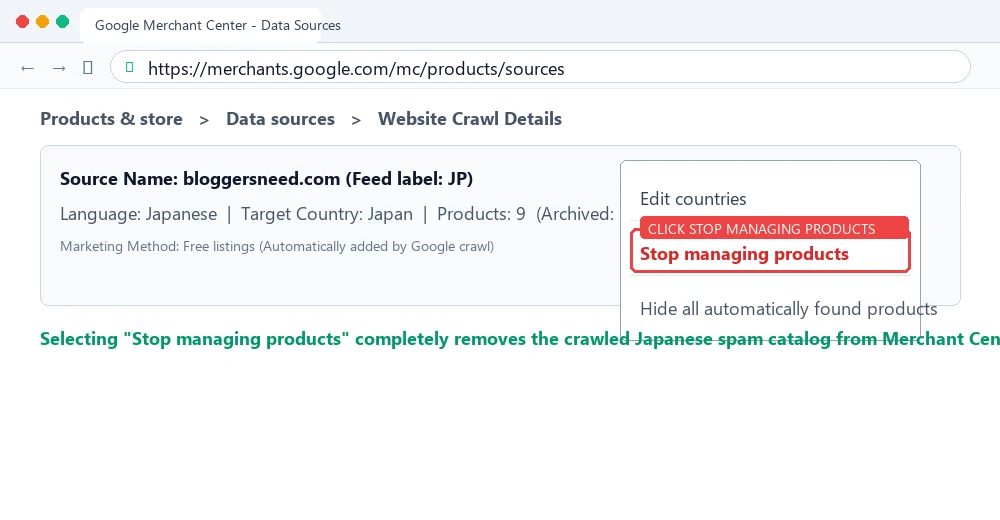
Click on the Website Crawl entry, open the settings menu, and select Stop Managing Products. Confirm the prompt when Google asks if you want to remove all crawled products.
Google will instantly remove the hundreds of Japanese items from your inventory. Because you have deleted the underlying doorway scripts, future crawls will find no microdata, keeping your account permanently clean.
Step 3: Hardening WordPress Filesystem and Server Execution
Hardening your server requires blocking PHP execution in uploads, disabling XML-RPC access, regenerating security keys in wp-config.php, and enforcing strict file permissions across your hosting environment.
Deleting doorway scripts solves only the immediate symptom. If you do not close the underlying security gap, automated malware scripts will reinfect your server within forty-eight hours.
At BloggersNeed, our technical team enforces three core defensive layers across every WordPress installation we manage.
Neutralizing Backdoors in the Uploads Directory
The WordPress uploads directory is the primary storage location for PHP web shells. Adding dedicated mod_rewrite rules inside wp-content/uploads blocks script execution while letting images load normally.
Attackers exploit vulnerabilities in outdated contact forms or media gallery plugins to upload malicious PHP files disguised as images. Once uploaded into /wp-content/uploads/, attackers trigger them through direct HTTP requests.
To eliminate this vulnerability, learn how to prevent PHP execution in WordPress uploads using an isolated .htaccess rule. Placing this directive inside your uploads directory stops PHP scripts from executing completely.
Disabling Attack Vectors via XML-RPC
WordPress XML-RPC is an obsolete API protocol frequently targeted by botnets for brute-force attacks. Disabling xmlrpc.php through server rules or Cloudflare prevents password guessing without disrupting your admin panel.
During our security audits, we frequently observe brute-force attacks against xmlrpc.php running alongside Japanese keyword hacks. The system.multicall method permits an attacker to test hundreds of passwords in a single request.
We recommend checking our complete tutorial on how to disable XML-RPC in WordPress to block this interface. Hardening XML-RPC reduces server CPU usage and eliminates a common credential guessing route.
Regenerating Security Salts and Passwords
Updating your security salts in wp-config.php immediately terminates all active sessions across your WordPress site. This invalidates stolen administrator session cookies and locks out intruders.
If an attacker captured an administrative session cookie during the intrusion, deleting the doorway files will not keep them out. Open your wp-config.php file using cPanel File Manager.
Visit the official WordPress salt generator at https://api.wordpress.org/secret-key/1.1/salt/ to generate eight new cryptographic keys. Replace the existing definitions in your configuration file.
define('AUTH_KEY',         'put your unique phrase here');
define('SECURE_AUTH_KEY',  'put your unique phrase here');
define('LOGGED_IN_KEY',    'put your unique phrase here');
define('NONCE_KEY',        'put your unique phrase here');
define('AUTH_SALT',        'put your unique phrase here');
define('SECURE_AUTH_SALT', 'put your unique phrase here');
define('LOGGED_IN_SALT',   'put your unique phrase here');
define('NONCE_SALT',       'put your unique phrase here');
Saving this file instantly logs out all active users. Log back in to your WordPress dashboard and update passwords for all legitimate administrator and editor accounts with strong credentials.
Step 4: Forcing Google to Drop Injected URLs (404 vs 410 Protocol)
To force Google to remove Japanese spam URLs, allow deleted paths to return standard HTTP 404 Not Found or HTTP 410 Gone status codes. Never redirect spam URLs to your homepage.
A frequent mistake webmasters make is creating wildcard redirects sending every Japanese URL to their homepage. In our testing at BloggersNeed, redirecting spam URLs harms your organic search rankings.
Google classifies bulk redirects of irrelevant URLs as soft 404 errors. When Googlebot encounters thousands of redirects pointing to your home page, it reduces crawl bandwidth for your real content.
Instead, let the deleted pages return an authentic HTTP 404 or HTTP 410 response. Google treats HTTP 410 Gone as an explicit signal that the resource is gone permanently, speeding up index removal.
Verify that your server returns a proper 404 status code using a terminal cURL command.
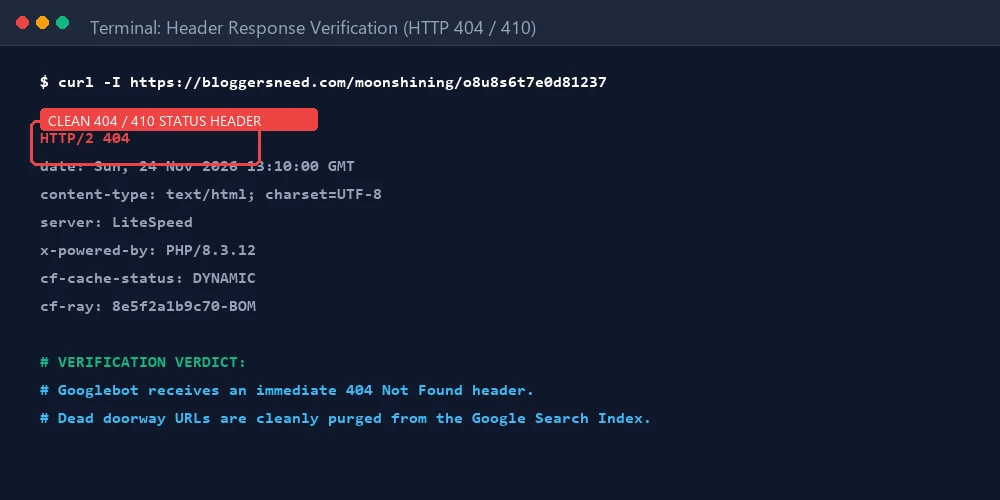
Next, access Google Search Console and inspect your XML sitemaps under Sitemaps. Verify that only legitimate sitemaps generated by your SEO plugin remain listed.
If you see sitemaps submitted by the attacker, delete them from Search Console. Then resubmit your primary clean sitemap to encourage Googlebot to recrawl your real URLs and refresh its index.
Frequently Asked Questions About the Japanese Keyword Hack
These answers clarify search index removal timelines, the impact on organic rankings, proper HTTP status code handling, and reasons for automated Google Merchant Center product generation.
How long does it take Google to remove Japanese spam URLs from search results?
Google typically takes between two and six weeks to de-index Japanese spam URLs after all malicious scripts are deleted. The removal speed depends on your site crawl rate and total spam volume.
Returning clean HTTP 404 or 410 headers ensures Googlebot drops the URLs naturally during scheduled recrawls. You can monitor progress in Google Search Console under the Page Indexing report.
Should I redirect Japanese spam URLs to my WordPress homepage?
You should never redirect Japanese spam URLs to your homepage because Google classifies bulk irrelevant redirects as soft 404 errors. This practice dilutes crawl budget and slows down legitimate indexing.
Search crawlers expect deleted pages to return an error code. When Googlebot encounters an authentic 404 or 410 header, it understands the content is gone and systematically purges the URL from the index.
Why did Google Merchant Center automatically add Japanese products to my account?
Google Merchant Center adds Japanese products when the Website Crawl feature is enabled and detects Schema.org Product microdata on doorway pages. The malware serves counterfeit product markup to Googlebot.
Navigating to Merchant Center Settings, selecting Data Sources, and clicking Stop Managing Products immediately eliminates the crawled items from your active shopping inventory.
Can the Japanese keyword hack reinfect my WordPress site after cleanup?
The Japanese keyword hack frequently reinfects WordPress sites if the original entry point remains unpatched. Attackers leave secondary PHP backdoors in the uploads directory or rogue administrator accounts in your database.
Maintaining strong server-level defenses by updating plugins, blocking PHP execution in uploads, and rotating security salts ensures botnets cannot re-execute malicious code.

I’m Abdullah Prem, a passionate blogger with over 10 years of experience. I created BloggersNeed to produce high-quality, easy-to-understand articles, guides, and tutorials that help people start their blogging journey. Specializing in WordPress, Hosting, Themes, and online money-making strategies, I’ve been featured on leading tech platforms such as Tech.co, Cloudways, Business2Community, Leadpages, GoodFirms, and ShareThis. BloggersNeed.com