
De-indexing is the deliberate removal of specific web links, pages, or entire domains from search engine results pages. Webmasters de-index content to protect confidential documents, resolve duplicate page issues, and optimize overall site crawl efficiency.
Modern search optimization requires managing index bloat effectively. When search bots crawl unnecessary files or low-quality articles, valuable crawl equity is wasted instead of powering revenue-generating pages.
Selecting the proper de-indexing method depends on whether you require temporary concealment or permanent removal. Using Google Search Console tools, robots.txt directives, HTTP status codes, and meta tags gives site owners precise control over indexation.
Quick De-indexing Method Summary
Selecting the proper de-indexing technique depends on your speed requirements and technical control. Google Search Console Removals provides instant temporary suppression within hours, while meta noindex tags and HTTP 410 headers permanently purge URLs from search indexes upon subsequent crawler verification.
- Fastest Temporary Removal: Google Search Console Removals Tool (Hides URL in 6 hours for up to 6 months).
- Best for Permanent Exclusion: HTML Meta Noindex Tag (Directs search bots to drop URL permanently).
- Best for Deleted Content: HTTP 410 Gone Status Code (Signals permanent file removal to crawlers).
- Best for Staging Environments: HTTP Authentication or Server Password Protection.
Table of Contents
What is De-indexing?
De-indexing is the intentional removal of specific web documents, hyperlinks, or entire domain infrastructures from search engine result pages. This technical search configuration prevents web crawlers from indexing private data, staging environments, thin articles, or outdated URLs across search engine directories.
When a search engine indexes a webpage, its crawlers fetch HTML files, render CSS code, parse JavaScript, and add the URL to their primary searchable database. De-indexing reverses this sequence by removing the document from the active index.
De-indexed pages remain completely accessible to direct website visitors who enter the URL into a browser address bar. The directive exclusively blocks search engine listings from displaying the URL to organic search users.
Why Google De-Indexes Websites
Google de-indexes websites when algorithms detect malicious behavior, manipulative link schemes, scraped content, or severe technical server errors. Search crawlers drop non-compliant domains from search indexes to protect searchers from deceptive spam, doorway pages, unoriginal scraped content, and security vulnerabilities.
Algorithmic penalties automatically strip indexing status from domains displaying artificial link profiles, hidden text, or doorway redirects. Recovering from algorithmic actions requires auditing backlink equity and pruning toxic links across your entire site structure.
Technical crawl failures also cause involuntary removals from Google Search. If your server produces persistent 5xx timeout errors or incorrect redirect chains, search bots assume the domain is defunct and slowly remove affected pages.
Persistent server latency and crawling misconfigurations often lead to unintended Google indexing issues that prevent high-quality articles from maintaining established rankings.
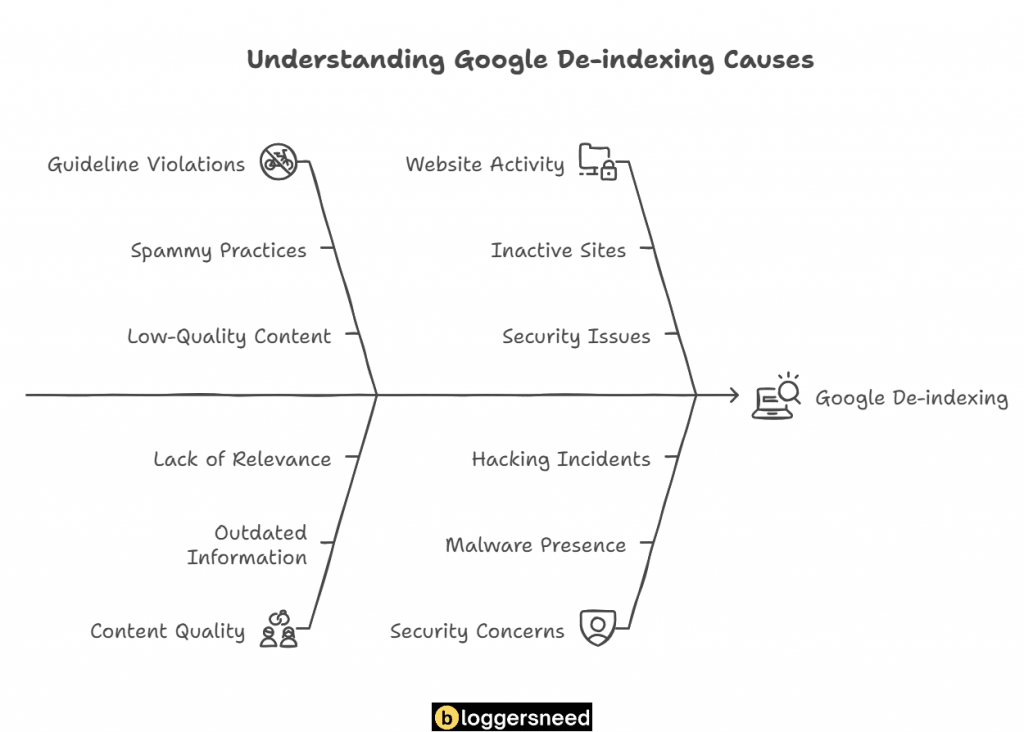
Google helpful content updates also trigger mass de-indexation of automated niche sites. Domains producing repetitive, unoriginal text without real-world testing experience lose search visibility during major core algorithm refreshes.
What Are the Common Reasons for Manual De-indexing?
Manual de-indexing occurs when webmasters deliberately exclude internal search query pages, checkout sequences, user login portals, or confidential staging sites from search engine discovery. Site operators initiate removals to consolidate search authority, preserve crawling budgets, and prevent indexation of duplicate content files.
E-commerce stores frequently generate thousands of faceted navigation URLs featuring filtered attributes like color, size, and price sorting. Leaving filtered parameters open to search bots produces duplicate content loops and dilutes domain ranking authority.
Private user accounts, client intake documents, and administrative portals must never appear in search query results. De-indexing these sensitive sections shields customer privacy while fulfilling global compliance obligations.
Publishers also de-index outdated press releases, expired promotional announcements, and superseded product documentation. Cleaning out dated archives focuses search engine crawler resources on high-converting product pages and fresh evergreen guides.
When to De-index a Link
Webmasters de-index specific links when individual URLs contain sensitive customer parameters, temporary marketing campaigns, duplicate pagination paths, or expired promotional discounts. Isolating non-canonical links protects search crawling budgets while focusing search authority on revenue-generating product pages and authoritative informational guides.
Uncontrolled URL growth strains server resources and wastes search bot crawl allocations. Removing tracking links, campaign tags, and internal sorting paths ensures search engines spend crawl bandwidth evaluating your primary cornerstone articles.
Before purging inbound backlinks, webmasters perform comprehensive domain audits to evaluate link equity. For auditing inbound link metrics and identifying toxic referral paths, examine our testing guide evaluating the best backlink analyzer tools available for digital publishers.
Temporary promotional links created for seasonal holiday events should also be de-indexed once campaigns conclude. Leaving expired promotion links active creates frustrating broken user experiences and signals poor site maintenance to search algorithms.
How to De-index a Link
De-indexing an individual link requires signaling web crawlers through HTTP response headers, robots directives, or Search Console removal tools. Selecting the correct technical mechanism prevents search bots from serving deprecated links to search users while maintaining proper internal architecture across your website.
Webmasters implement three primary technical workflows when excluding specific links from public search results. The optimal approach depends on your server access level, content management system, and removal timeline urgency.
The primary technical methods for link removal are outlined below.
- Submitting rapid temporary removal requests using Google Search Console dashboard controls.
- Configuring server robots.txt disallow rules to prevent search bots from crawling targeted link pathways.
- Injecting meta noindex directives directly into the HTML document header of the target page.
Use Google Search Console to Request Removal
To remove url from google search results within hours, webmasters submit urgent URL removal requests through Google Search Console. This temporary action blocks the link from search results for six months while technical teams update server headers or remove underlying files.
The Search Console Removals dashboard serves as an emergency stopgap rather than a permanent deletion system. It instantly suppresses visible search listings, providing administrators sufficient runway to implement permanent server configurations.
To submit a removal request, open your Search Console dashboard and locate the Removals tab in the left sidebar menu. Click the New Request button, enter your absolute URL, select Remove this URL only, and submit your request.
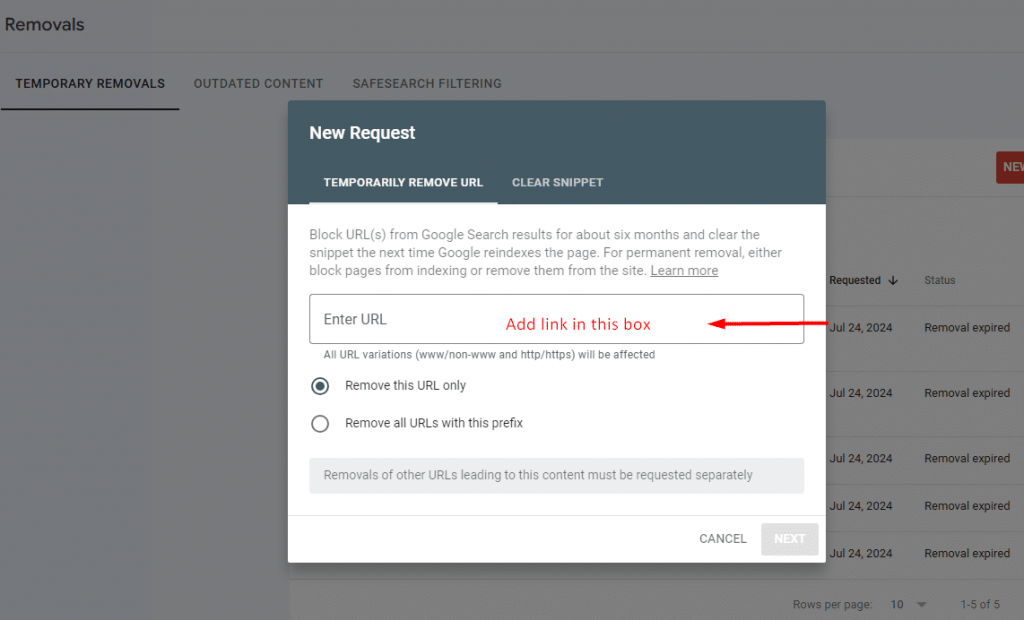
Google processes removals within two to six hours of submission. Check the dashboard status indicator after submission to ensure your request transitions from Processing to Temporarily Removed.
Add a Robots.txt Block for Specific Links
Blocking links through robots.txt instructs search crawler user-agents not to fetch or process designated file paths on your server. Disallow directives prevent search bots from discovering underlying link content, though URLs with external backlinks may still index without descriptive snippets.
A common misconception among beginner site owners is assuming robots.txt disallow rules guarantee complete de-indexation. While crawlers will not request the page content, Google can still display a bare URL snippet if external websites link to that location.
To prevent search engines from crawling custom subdirectories, add standard disallow commands to your text file. For step-by-step instructions on structuring server directives, read our tutorial on creating a robots.txt file properly.
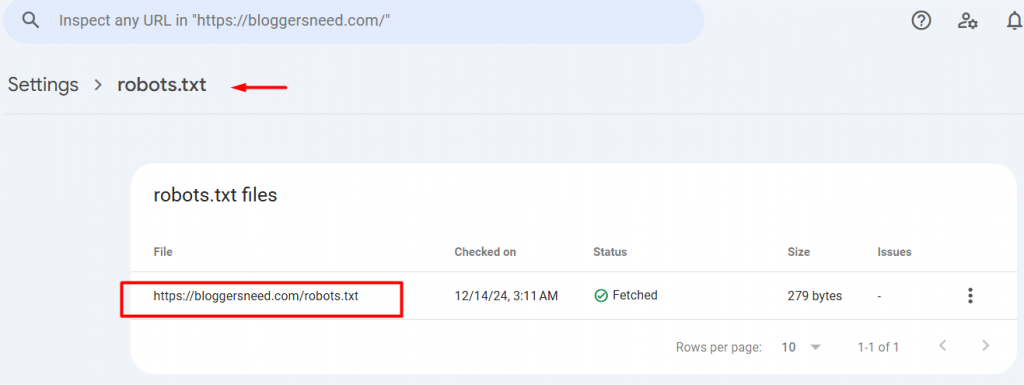
Validate your updated syntax using Google Search Console robots.txt inspection tools. Verifying your rules in testing prevents accidental blocks across valuable public pages.
Use the Meta Noindex Tag for Temporary Removal
Applying a meta noindex tag provides a dependable mechanism to instruct web crawlers to discard specific URLs from search indexes. Search engines parse the HTML directive during recurring crawls and safely extract the target link from public search queries within days.
Unlike robots.txt disallow commands, the meta noindex directive allows search bots to crawl the page header and read explicit indexing instructions. Upon reading the tag, Googlebot removes the URL completely from organic search results.
The meta tag offers flexibility because it can be reversed at any point. Removing the tag and resubmitting the URL allows search engines to re-index the page when updates are complete.
When to De-index a Page
Website managers should de-index a page when user-facing content becomes obsolete, contains duplicate text, or serves internal tracking purposes like thank-you screens. Suppressing low-value URLs prevents index bloat, concentrates link equity across priority landing pages, and enhances domain crawl efficiency.
Search engines rank websites based on overall domain quality and topical authority. Hosting hundreds of thin, unedited, or duplicative pages lowers domain quality scores and slows down the indexing of fresh cornerstone articles.
Conversion funnel pages like lead magnet confirmations, account dashboards, and cart sequences provide zero search value to external users. Excluding these operational URLs prevents searchers from entering checkout workflows out of order.
When conducting site redesigns or merging older articles, de-indexing low-performing pages cleans up organic search footprints. Eliminating underperforming pages consolidates ranking signals on comprehensive guide articles that drive commercial revenue.
How to De-index a Page
Mastering how to deindex a page involves deploying meta robots directives, HTTP response headers, or search engine removal requests. Selecting between server status codes and CMS controls determines whether search engines remove the page temporarily or purge the URL permanently.
Webmasters choose among four proven technical workflows when de-indexing individual pages. Each implementation offers distinct benefits depending on whether the page remains live on your server or has been deleted.
The proven technical methods are detailed below.
- Submitting temporary URL suppression requests through Google Search Console.
- Embedding standard HTML meta robots noindex tags in the document head.
- Returning server-level HTTP status codes like 404 Not Found or 410 Gone.
- Configuring automated noindex toggles within WordPress SEO plugins.
Google Search Console Removals Tool
The Google Search Console Removals tool enables verified site owners to conceal outdated or sensitive URLs from search results rapidly. Submitting an official removal request hides the listing for approximately six months while website administrators configure permanent server-side exclusions or HTTP headers.
The tool works by instantly blocking the URL from Google Search result presentations. While searchers cannot view the link, Googlebot continues to crawl the page behind the scenes unless blocked by headers.
Use this tool when urgent privacy issues or accidental confidential leaks require immediate mitigation. Always follow up with a permanent meta noindex tag or HTTP response code before the six-month suppression window expires.
Meta Noindex Tag Implementation
Inserting an official meta name robots content noindex tag into a document header instructs search bots to purge the URL upon crawling. Search crawlers render the header code, register the exclusion directive, and systematically drop the target webpage from public search listings.
To have google deindex page content safely, webmasters embed the meta robots directive inside the HTML document head. Googlebot processes this directive upon subsequent crawls and removes the URL from search engine results pages.
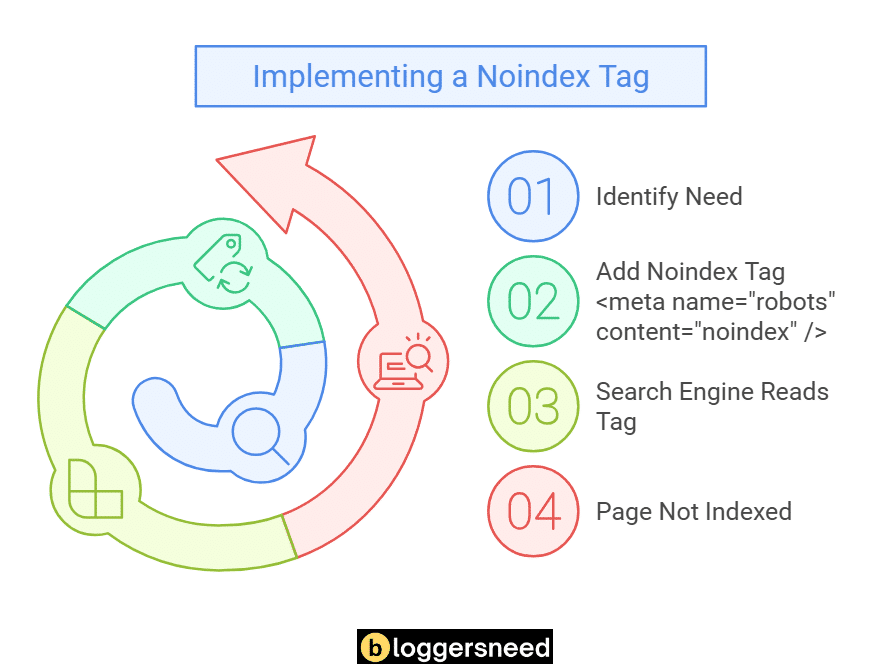
Ensure your robots.txt file does not block search crawlers from accessing the URL. If crawlers are blocked by robots.txt, they cannot fetch the HTML code to read your noindex directive.
HTTP Response Code Configuration (404 and 410)
Configuring HTTP 410 Gone or 404 Not Found response codes permanently purges deleted webpages from search engine indexes. Web servers emitting a 410 status inform search crawlers that the document was intentionally deleted, accelerating complete de-indexation compared to standard 404 responses.
When Googlebot encounters an HTTP 404 Not Found code, it checks the URL multiple times over subsequent weeks to confirm the outage is not accidental. This verification delay slows down the removal process.
In contrast, an HTTP 410 Gone status explicitly confirms intentional and permanent file deletion. Search crawlers drop 410 URLs from search indexes significantly faster than conventional 404 pages.
If obsolete content is replaced by an updated article, consider implementing an HTTP 301 Permanent Redirect instead. A 301 redirect transfers accumulated backlink authority to the fresh replacement page while purging the old URL.
Using WordPress SEO Plugins to Noindex Content
Configuring WordPress SEO plugins like Rank Math or Yoast allows site editors to toggle noindex tags without editing template files. These search plugins inject robots meta headers across individual posts, custom post types, or taxonomic categories with single-click administrative controls.
Popular WordPress SEO plugins streamline indexing management across complex websites. Editors simply open the post editor, locate the advanced SEO meta box, and select the No Index checkbox.
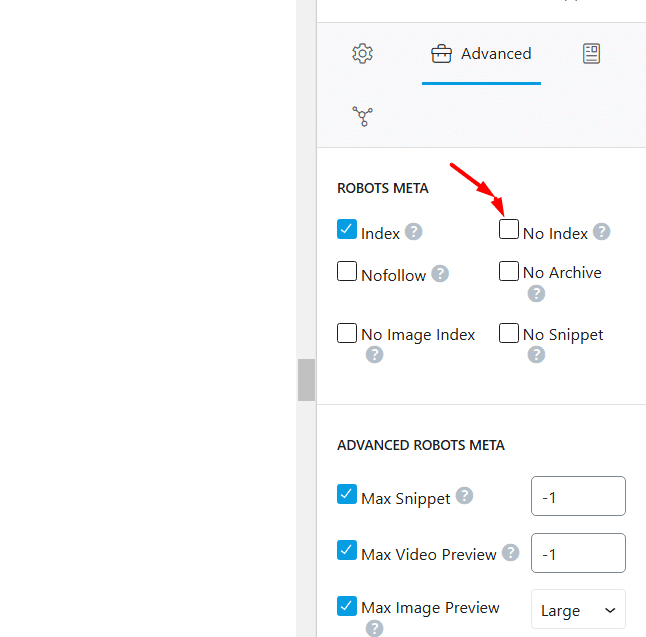
Plugins also manage bulk indexation settings for author archives, date archives, and category tag pages. Disabling thin archive pages site-wide prevents duplicate content penalties across growing WordPress blogs.
When to De-index a Website
De-indexing an entire website becomes necessary during staging development, site migrations, corporate acquisitions, or complete business shutdowns. Removing an entire web property from search engines protects proprietary software code, prevents unapproved public access, and eliminates duplicate content penalties across test servers.
Development and staging sites must never be indexed by public search engines. If search engines crawl a duplicate staging version of your production site, domain authority splits between the two properties, triggering severe traffic declines.
Corporate rebranding projects involving full domain migrations also require careful whole-site management. Once content moves to the new domain, old URLs should redirect or de-index systematically to prevent brand confusion.
Discontinued e-commerce projects or decommissioned web applications should be retired cleanly. Purging the entire domain ensures expired domain buyers or web scrapers cannot abuse your historical search footprints.
How to De-index a Website
To deindex website google listings across an entire domain, administrators implement site-wide noindex HTTP headers, basic HTTP authentication, or WordPress search visibility settings. These global configurations block search crawlers from accessing every subdirectory, template, and hosted asset on the server.
Selecting the right technical method depends on whether the website will return to public view in the future. Staging environments require reversible temporary blocks, while retired domains require permanent server de-commissioning.
Carefully document your indexed URLs and create complete database backups before initiating site-wide de-indexing. Having backups ensures you can restore content if business requirements change.
Temporary Website De-indexing Strategies
Temporary website de-indexing shields active development environments or staging subdomains from search engine crawlers during system overhauls. Site owners activate server password protection, IP whitelisting, or WordPress reading settings to discourage search engines without damaging long-term historical search ranking equity.
The simplest method on WordPress platforms involves toggling the search engine visibility setting. Navigate to Settings and select Reading in your WordPress dashboard, then check Discourage search engines from indexing this site.
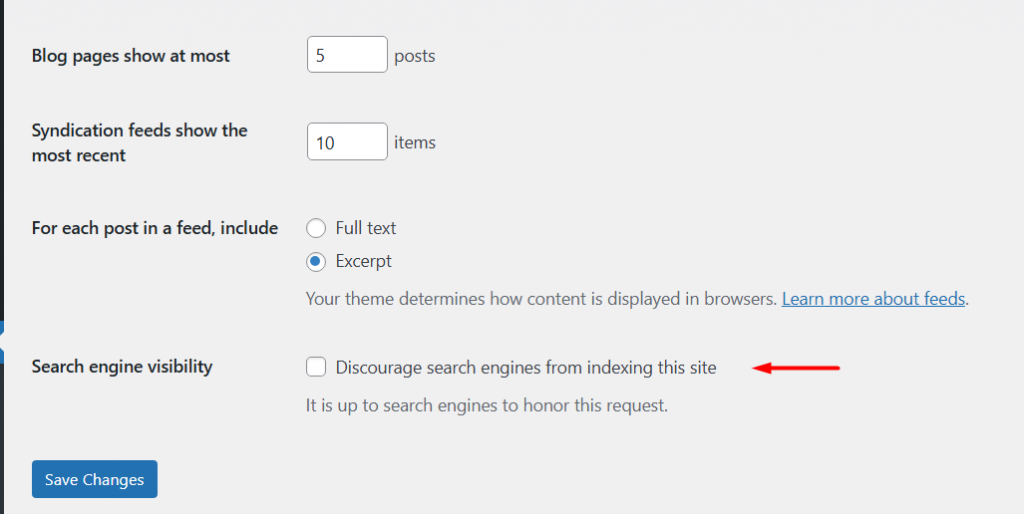
For non-WordPress environments, configuring HTTP Basic Authentication at the web server level provides airtight protection. Search bots cannot authenticate through password dialogs, preventing any file discovery across private subdomains.
Permanent Website De-indexing Protocol
Permanent website de-indexing requires returning site-wide HTTP 410 headers, terminating domain DNS routing records, or submitting domain removal requests in Search Console. These deliberate technical actions permanently drop every indexed page from public search indexes and release server crawling overhead over time.
If you are decommissioning a site permanently, updating the server configuration to emit HTTP 410 Gone across all incoming requests is the fastest approach. Search bots encounter the status code across all pathways and purge listings within weeks.
If the domain is being discontinued entirely, removing DNS A records shuts down public web routing. Search crawlers encounter connection timeouts and systematically remove inactive URLs from database indexes.
How to Index Links Correctly in 2026
Indexing links correctly requires generating clean XML sitemaps, establishing contextual internal links, and submitting fresh URLs through search engine indexing interfaces. Implementing structured data, improving server response times, and securing authoritative referral links helps search bots discover and rank web pages quickly.
While de-indexing removes unwanted content, ensuring priority commercial articles index rapidly is equally vital for search success. Understanding complete link indexing techniques helps webmasters achieve rapid search visibility for newly published content.
Maintaining a healthy internal link architecture ensures search crawlers discover newly published content efficiently. Regularly auditing your site to fix broken links eliminates crawler dead-ends and preserves search equity across your entire domain.
When publishing urgent news or seasonal guides, relying solely on standard crawl cycles can lead to indexing delays. Utilizing specialized website indexing services accelerates search bot discovery across newly updated URLs.
Explore Fast Website Indexing Tools
FAQs: De-indexing Links, Pages, and Websites
Common questions regarding link and page de-indexing focus on removal timeframes, search visibility impacts, differences between deleting and de-indexing, and robots.txt behavior. Understanding these technical nuances prevents unintended search ranking drops and maintains clean indexation across your entire web domain.
How Long Does It Take for De-indexing to Take Effect?
De-indexing requests submitted through Google Search Console typically take six to twenty-four hours to hide listings from search results. Permanent de-indexing using meta noindex tags or HTTP 410 headers requires Googlebot to re-crawl the page, which takes several days to weeks.
The exact timeline depends on your domain crawl frequency and server responsiveness. High-authority websites with daily crawler activity experience faster removals than smaller sites with infrequent bot visits.
Will De-indexing Affect My SEO Rankings?
De-indexing low-quality, thin, or duplicate pages improves overall SEO rankings by consolidating link equity and optimizing crawler resource allocation. However, removing high-authority pages that generate organic backlinks or internal PageRank flow can temporarily reduce domain visibility and organic search traffic.
Auditing inbound backlink equity before de-indexing prevents accidental losses of ranking signals. If an underperforming URL has quality backlinks, redirect the page to a relevant alternative instead of de-indexing.
What’s the Difference Between De-indexing and Deleting?
De-indexing removes a webpage from search engine results while preserving the live file and database records on your web server. In contrast, deleting completely removes the page and assets from the hosting server, returning an HTTP 404 or 410 status to browsers.
De-indexing allows direct visitors and email subscribers to continue accessing content through shared links. Deleting breaks existing visitor bookmarks and requires configuring server redirects to avoid dead ends.
Does Robots.txt Automatically Remove Indexed URLs from Google?
Robots.txt disallow directives do not remove previously indexed URLs from Google Search listings. Googlebot cannot crawl a disallowed page to read noindex meta directives, causing the URL to remain indexed with an informational snippet if other sites link to it.
To purge an indexed URL completely, allow crawlers to access the page while serving a meta noindex tag. Once search engines drop the listing, you can add robots.txt disallow rules.

I’m Abdullah Prem, a passionate blogger with over 10 years of experience. I created BloggersNeed to produce high-quality, easy-to-understand articles, guides, and tutorials that help people start their blogging journey. Specializing in WordPress, Hosting, Themes, and online money-making strategies, I’ve been featured on leading tech platforms such as Tech.co, Cloudways, Business2Community, Leadpages, GoodFirms, and ShareThis. BloggersNeed.com