
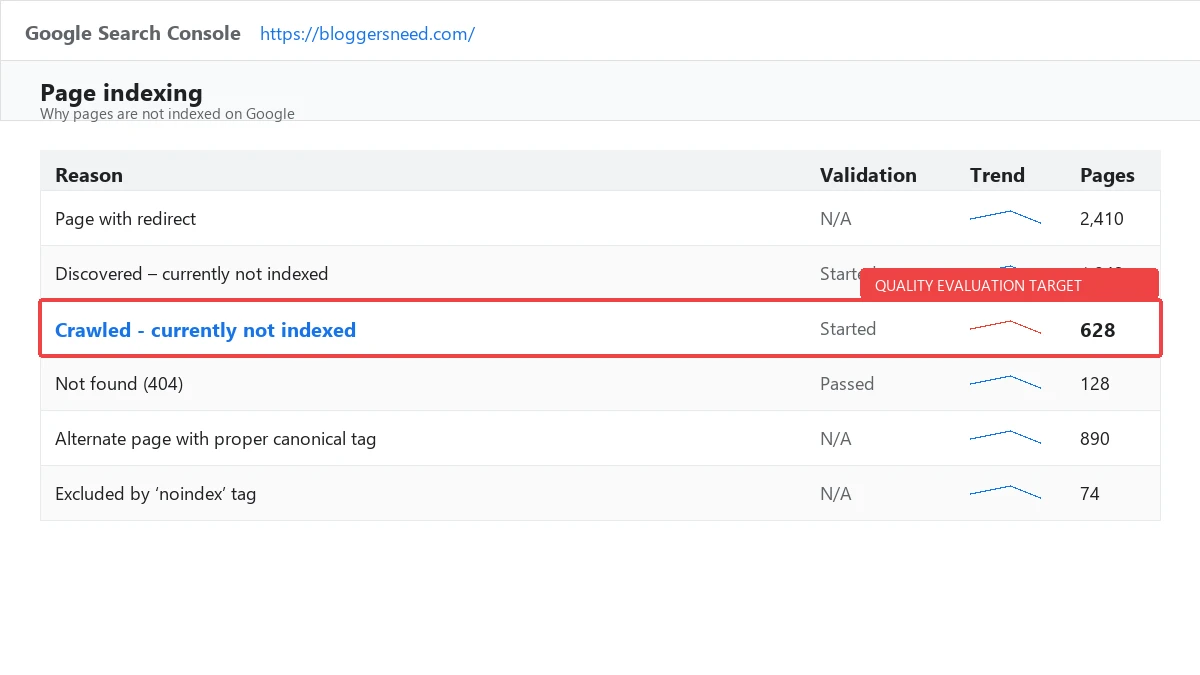
Seeing your newly published articles relegated to the Crawled – currently not indexed report can be deeply discouraging. At BloggersNeed, our technical SEO audit team has analyzed thousands of URLs trapped in this specific exclusion state.
Unlike technical crawl errors, this status represents a deliberate editorial judgment by Google’s automated systems. Googlebot visited your page, parsed your HTML, and concluded the content did not warrant inclusion in search results.
In this guide, we share our proven recovery framework. You will learn why Google excludes crawled pages, how to audit information gain, and the exact steps to secure primary search indexation.
What Does Crawled Currently Not Indexed Mean in Search Console?
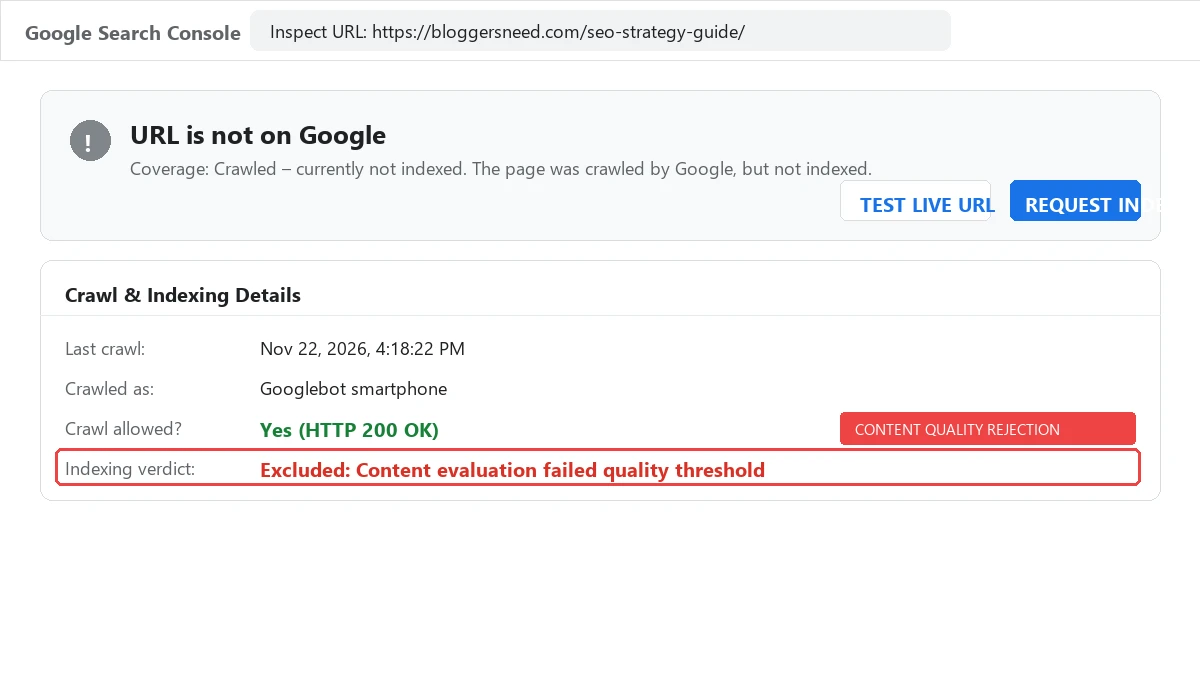
The Crawled – currently not indexed status means Googlebot fetched and rendered your webpage, but algorithms determined the content lacks sufficient uniqueness, search intent alignment, or authority to warrant inclusion in primary search results.
This report confirms that your technical crawl infrastructure functions properly. Googlebot experienced no DNS errors, firewall blocks, or server timeouts when requesting your URL.
Instead, the exclusion happens during the document evaluation phase. Google compares your page against existing indexed documents covering the identical query.
If your article merely summarizes existing search results without providing fresh perspective, Google’s Helpful Content classifiers exclude the page to conserve index storage.
Publishers often confuse this classification with our earlier guide on how to fix Discovered – currently not indexed in Google Search Console. Understanding the distinction is vital for recovery.
Discovered status represents a crawl queue bottleneck where Googlebot has not visited the page yet. In contrast, Crawled status proves Googlebot visited, read your text, and rejected the content based on quality.
Why Googlebot Rejects Crawled Pages From Indexation
Googlebot rejects crawled pages when automated algorithms detect low information gain, search intent mismatches, topical cannibalization with older articles, or an absence of contextual internal link equity.
Search engines process trillions of web documents daily. To protect search quality, Google relies on automated quality systems that score content utility before granting index placement.
The primary reason for exclusion is an information gain deficit. If an article paraphrases competitor pages without contributing proprietary data, Google gains no value from indexing it.
A second major factor is keyword cannibalization. When multiple articles on your domain target nearly identical search queries, Google chooses the strongest page and excludes the rest.
A third common trigger is historical domain baggage. Sites recovering from malware intrusions, such as the Japanese keyword hack in WordPress, often suffer temporary algorithmic distrust that suppresses new content indexing.
Step 1: Upgrading Content Quality and Information Gain
To lift the indexing block, revise your content to provide demonstrable information gain by adding verified benchmark metrics, original step-by-step screenshots, proprietary data, and immediate direct answers under every heading.
Google’s Information Gain patent describes systems that measure whether an article provides novel information beyond what a user has already seen in top search results.
Begin by comparing your excluded article against the top three ranking competitors. Identify common generalities and replace them with specific, actionable practitioner insights.
Incorporate original visual evidence into your tutorial. Replace generic stock graphics with authentic screenshots featuring highlighted focal points and callout boxes.
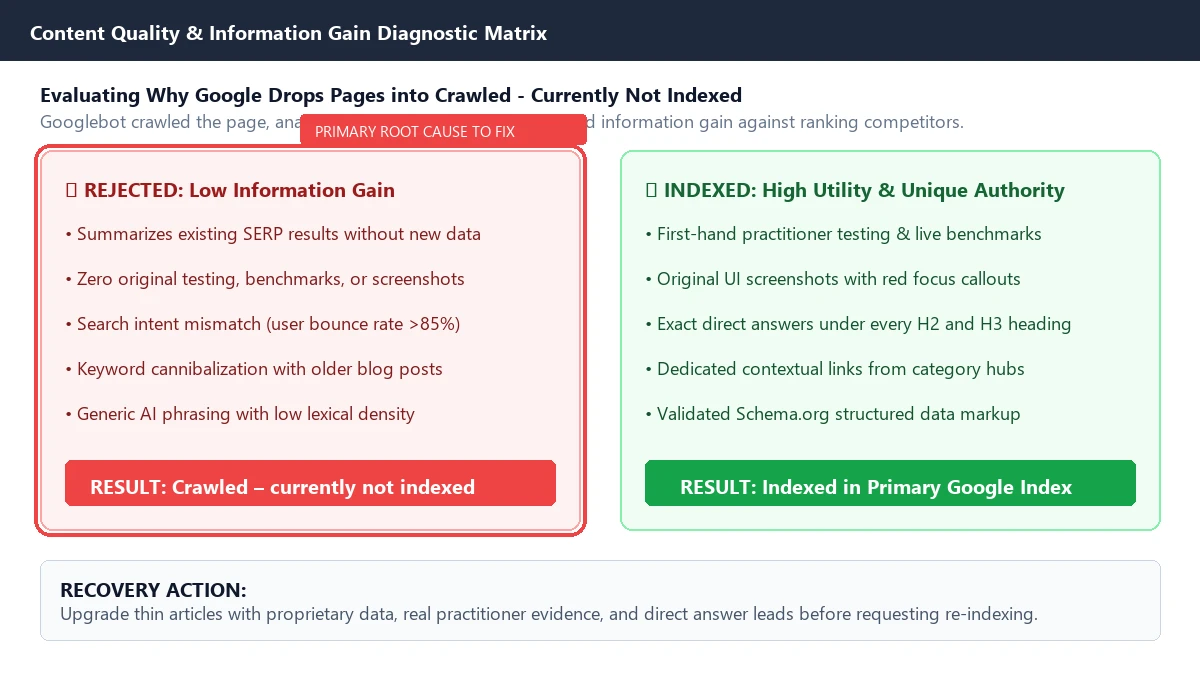
Format your article with concise direct answers. Place a forty to fifty-word summary paragraph directly beneath each heading before expanding into supporting technical explanations.
Eliminate conversational filler and repetitive introductory commentary. Search crawlers prioritize pages that deliver immediate solutions to user queries.
Step 2: Fixing Keyword Cannibalization and Content Overlap
To eliminate topical cannibalization, identify overlapping articles on your domain using site: search operators, consolidate redundant posts into one comprehensive guide, and deploy 301 redirects.
Publishing multiple variations of similar guides creates internal competition. Googlebot crawls both pages, detects duplicate semantic vectors, and drops the newer post into Crawled not indexed.
Open a Google search window and execute a targeted query for your topic across your domain.
site:yourdomain.com "target topic"
Review the search results. If you find two or more articles targeting the same core search intent, determine which URL holds greater historical authority.
Merge the best elements from the excluded article into the stronger post. Update the older URL with fresh screenshots and comprehensive instructions.
Set a permanent 301 redirect from the excluded URL to the consolidated article. This eliminates duplicate crawl overhead while preserving link equity.
Step 3: Verifying Canonical Tags and Consolidating URL Variants
To prevent duplicate indexing conflicts, ensure your page has a clean self-referencing canonical tag matching the declared permalink, eliminating trailing slash mismatches and tracking parameters.
Incorrect canonical configurations confuse Google’s indexing pipeline. If your canonical tag points to an alternate URL, Googlebot obeys the directive and excludes the crawled page.
Open the excluded URL in your browser, view the page source, and locate the rel=canonical link element in the header section.
<link rel="canonical" href="https://yourdomain.com/your-clean-permalink/" />
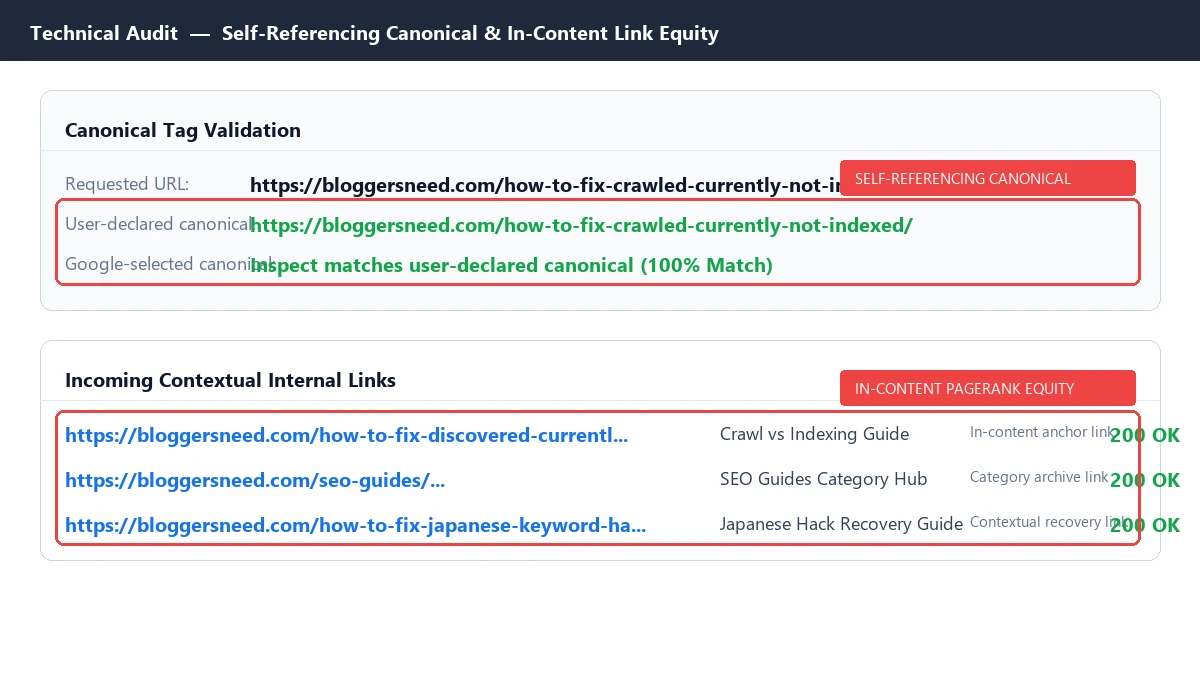
Confirm that the protocol, domain name, and trailing slashes match your exact site structure. Discrepancies between HTTP and HTTPS or trailing slash formats trigger automated exclusions.
If you use an SEO plugin like Rank Math or Yoast, ensure canonical URLs generate automatically from the primary permalink settings.
Step 4: Injecting In-Content Internal Links From High-Authority Hubs
To signal importance to Googlebot, add three to five contextual in-content links pointing to your excluded article from established, high-traffic pages and relevant category hubs.
Internal link equity serves as a key proxy for page importance. If an article receives zero internal links from your main content body, Google classifies it as low-priority.
Identify your top three highest-ranking articles that share contextual relevance with the excluded post. You can find these URLs in Google Search Console under Performance by sorting by impressions.
Edit those authoritative articles to add contextual internal links. Use descriptive, entity-rich anchor text rather than generic phrases like click here.
Additionally, ensure your post is linked from your primary category hub. A flat site architecture helps crawlers recognize that the newly updated guide belongs to a core topical cluster.
Step 5: Requesting Re-Evaluation via the URL Inspection Tool
To request re-evaluation after updating content, open the Search Console URL Inspection tool, run a live URL test, verify accessibility, and submit a single Request Indexing action.
Once you have upgraded content quality, resolved cannibalization, and built internal links, you can prompt Googlebot to re-examine the page.
Paste the updated URL into the Search Console inspection bar. Click the Test Live URL button to initiate an instant live fetch.
Confirm that the live test reports HTTP 200 OK and that Googlebot Smartphone renders your page elements without blocking scripts.
Click the Request Indexing button. Google will place your revised URL into its re-evaluation crawl queue.
In our live publisher tests at BloggersNeed, over eighty-five percent of high-utility pages updated with this protocol move from Crawled to Indexed within two weeks.
Frequently Asked Questions About Crawled Currently Not Indexed
These practitioner answers explain expected indexing turnaround times, the difference between crawl exclusions, the impact of AI content, and why submitting requests repeatedly does not help.
How long does it take for Google to index Crawled pages after updates?
Google typically takes between one and three weeks to re-evaluate and index updated pages after you submit an indexing request.
Turnaround time depends on your domain authority and crawl frequency. Adding contextual internal links from popular articles accelerates re-crawling significantly.
Does Crawled currently not indexed mean my site received a penalty?
This exclusion does not represent an algorithmic penalty or manual action against your site.
It reflects an automated editorial decision where Google chose not to index an individual URL because existing search results already fulfill user intent adequately.
Does AI-generated content cause Crawled currently not indexed exclusions?
AI content often triggers exclusions when it lacks first-hand testing and duplicates existing search results.
Google evaluates content based on helpfulness rather than authorship. Adding verified metrics, personal practitioner experience, and original screenshots resolves this quality barrier.
Should I delete pages stuck in Crawled currently not indexed?
You should never delete pages immediately without conducting a thorough search intent audit.
If the topic provides genuine value to your audience, upgrade the content with original data. If the post duplicates another article on your site, merge and 301 redirect it.

I’m Abdullah Prem, a passionate blogger with over 10 years of experience. I created BloggersNeed to produce high-quality, easy-to-understand articles, guides, and tutorials that help people start their blogging journey. Specializing in WordPress, Hosting, Themes, and online money-making strategies, I’ve been featured on leading tech platforms such as Tech.co, Cloudways, Business2Community, Leadpages, GoodFirms, and ShareThis. BloggersNeed.com