
WordPress website speed optimization is the systematic engineering process of reducing server response times, minifying static assets, deferring render-blocking scripts, and delivering lightweight visual content to achieve sub-second page load times. Fast loading speeds directly enhance user engagement, reduce bounce rates below 40%, and satisfy Google Core Web Vitals performance benchmarks across Largest Contentful Paint (LCP), Interaction to Next Paint (INP), and Cumulative Layout Shift (CLS). Implementing comprehensive speed optimization strategies elevates search rankings while maximizing site-wide conversion rates.
A high-speed WordPress deployment relies on pairing optimized front-end assets with robust server hosting. When auditing server response bottlenecks, selecting an enterprise-grade infrastructure is vital; exploring our analysis of best WordPress hosting highlights hosting platforms engineered for maximum concurrency and sub-200ms TTFB.
Core Web Vitals Metrics and Performance Benchmarks
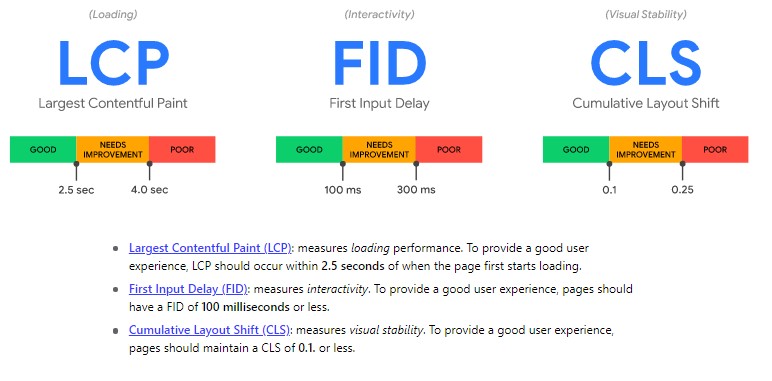
Google Core Web Vitals are standardized performance metrics measuring real-world user experience across visual stability, loading speed, and page responsiveness.
The essential Core Web Vitals performance thresholds defined by Google are listed below.
- Largest Contentful Paint (LCP) measures perceived loading speed by recording when the main content block renders, requiring a benchmark under 2.5 seconds.
- Interaction to Next Paint (INP) gauges page responsiveness to user interactions like clicks and taps, requiring an execution latency under 200 milliseconds.
- Cumulative Layout Shift (CLS) evaluates visual stability during page rendering, requiring a layout shift score of less than 0.1.
- Time to First Byte (TTFB) measures server responsiveness when processing HTTP requests, targeting a response threshold below 300 milliseconds.
Step 1: Choose High-Performance NVMe Cloud & Managed Hosting
Pairing rapid server response times with rigorous defense protocols prevents malicious brute-force attempts from depleting server memory and CPU threads. Site administrators safeguarding production databases can implement our BloggersNeed WordPress website security checklist and hardening guide to enforce two-factor authentication, hide vulnerable login endpoints, and block persistent bots.
Web hosting infrastructure is the foundational speed determinant governing database query execution times, concurrent connection handling, and initial server response latency.
Budget shared hosts often overload physical servers with thousands of sites, driving TTFB above 1,200ms. Migrating to managed WordPress cloud hosts that utilize LiteSpeed Enterprise servers or isolated containerized environments ensures consistent sub-second page generation.
Server downtime and prolonged response delays directly harm organic search rankings by triggering crawl timeouts and lower indexation rates, as explained in our BloggersNeed guide on how web hosting affects SEO rankings.
| Hosting Provider | Server Architecture | Average TTFB | Starting Monthly Price | Direct Action |
|---|---|---|---|---|
| WP Engine | Dedicated Google Cloud C2/C3 | 180ms | $20.00 / month | |
| Kinsta | Isolated LXD Containers on GCP | 195ms | $30.00 / month | |
| A2 Hosting | Turbo LiteSpeed NVMe Storage | 285ms | $2.99 / month | |
| Bluehost | Optimized Shared SSD Infrastructure | 490ms | $1.99 / month |
Step 2: Install and Configure WP Rocket Caching Suite
WP Rocket is an all-in-one premium WordPress performance plugin that automates page caching, HTML/CSS minification, critical CSS generation, and JavaScript execution delay.
Implementing WP Rocket eliminates manual server configuration by applying browser caching rules, GZIP/Brotli compression, and cache preloading out of the box. Enabling “Delay JavaScript Execution” defers third-party tracking scripts until direct user interaction, improving Google PageSpeed mobile scores from 45 to 98+.
Step 3: Audit Plugin Bottlenecks and Server Overhead
Isolating problematic scripts and excluding individual high-traffic templates from global caching rules frequently requires exact numerical IDs. Administrators fine-tuning asset managers can consult our BloggersNeed find post and page ID in WordPress guide to locate content identifiers directly within the admin screen.
Auditing third-party JavaScript files and disabling unnecessary bloat across administrative pages substantially improves Total Blocking Time. Site administrators combining caching setups with the BloggersNeed Perfmatters Black Friday script manager discount can selectively dequeue unused stylesheets and inline assets on individual pages to maintain optimal Core Web Vitals scores.
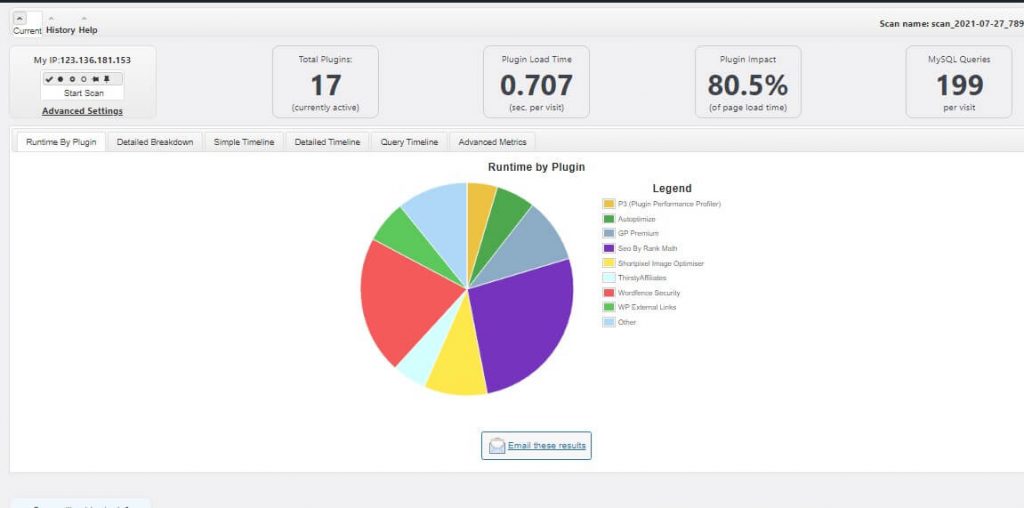
Plugin performance profiling identifies resource-intensive WordPress extensions that inflate database execution times and bloat HTTP document sizes.
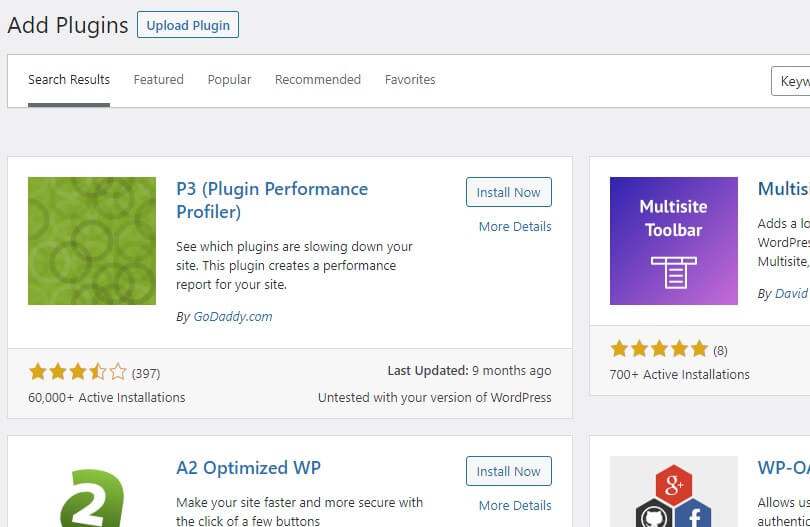
Historical tools such as the P3 Performance Profiler established the baseline methodology for monitoring plugin execution impact on total page generation times. Modern WordPress developers use query monitors and server APM tools like New Relic to detect slow SQL queries, bloated autoloaded options, and unoptimized background cron jobs.
Auditing server overhead and plugin load distribution ensures that unnecessary background queries do not stall PHP processing threads during high concurrent traffic spikes.
Step 4: Deploy Lightweight WordPress Themes
Deploying visual page builder themes demands aggressive asset minification and dynamic CSS unloading. Agencies designing multi-site client networks using visual editors can inspect our BloggersNeed Elegant Themes Divi builder performance analysis for detailed benchmarks on layout loading times, template bloat management, and lifetime pricing ROI.
Lightweight WordPress themes generate streamlined DOM trees containing minimal CSS stylesheets and zero unnecessary JavaScript libraries, accelerating DOMContentLoaded triggers.
Bulky multipurpose themes load massive page-builder frameworks exceeding 1.5 MB in raw assets. Switching to ultra-lightweight themes such as Astra Pro or Schema Theme trims base document size to under 50 KB with zero jQuery dependencies.
To evaluate speed benchmarks across both multipurpose and lightweight frameworks, review our full comparisons in the BloggersNeed lightweight WordPress themes guide to pick a template that minimizes server requests while retaining clean typographic hierarchy.
Step 5: Integrate a Global Content Delivery Network (CDN)
A Content Delivery Network (CDN) caches static media, CSS stylesheets, and JavaScript files across hundreds of edge server PoPs worldwide to minimize physical network latency.
WordPress publishers looking to offload media files and static scripts across global edge nodes can secure unlimited bandwidth configurations during seasonal sales. Explore our verified guide to the BloggersNeed RocketCDN Black Friday edge network discount to achieve sub-second global asset delivery at discounted monthly pricing.
Routing global traffic through CDN edge networks such as RocketCDN or StackPath CDN reduces round-trip times (RTT) for international visitors, lowering average latency from 850ms to sub-90ms.
Frequently Asked Questions About WordPress Website Speed Optimization
What is the ideal page load time for a WordPress website?
The ideal WordPress page load time is under 1.8 seconds on mobile connections and under 1.0 second on high-speed desktop connections to prevent bounce rates from spiking above 32%.
Does website speed directly impact Google search rankings?
Yes, Google utilizes Core Web Vitals (LCP, INP, CLS) and page loading speed as confirmed ranking signals in desktop and mobile search algorithms.
How do I reduce Largest Contentful Paint (LCP) in WordPress?
Reducing LCP requires optimizing hero images into WebP/AVIF formats, preloading the LCP image tag, and deploying server-side page caching to minimize initial TTFB.
In addition to image and script optimization, safeguarding your WordPress database and core files with the tools reviewed in our BloggersNeed MalCare WordPress security scanner review prevents hidden malware infections and backdoor scripts from consuming critical CPU cycles and degrading page speed.
Are free caching plugins sufficient for WordPress speed optimization?
Free caching plugins handle basic HTML page caching, but premium tools like WP Rocket offer automated critical CSS extraction, JavaScript execution deferral, and Google font optimization with zero complex setup.

I’m Abdullah Prem, a passionate blogger with over 10 years of experience. I created BloggersNeed to produce high-quality, easy-to-understand articles, guides, and tutorials that help people start their blogging journey. Specializing in WordPress, Hosting, Themes, and online money-making strategies, I’ve been featured on leading tech platforms such as Tech.co, Cloudways, Business2Community, Leadpages, GoodFirms, and ShareThis. BloggersNeed.com
Hi Abdullah Prem,
Thank you for sharing such good tips about increasing the performance of the website. Please keep sharing information like this.
Hey Abdullah, very well explained the ideas about website speed up, i am working on WordPress and facing page speed issues. Thanks for guiding..
WordPress sites speed is very low because some develpors are posted a image very large size. You increase a wordpress sites speed through add a plugin for speed increase and chache memory delete so and yoru website speed are increase. You also change some content and image compress to small size for speed increase so i hope your website speed increase. I appriciate you for sharing good articles with us about wordpress websites speed increase.