

Divi Theme Review October 2026: Features, Speed Benchmark & Pros/Cons
Is Elegant Themes’ Divi Theme still worth it for WordPress webmasters in October 2026? Evaluate visual drag-and-drop page builder speed, 2,000+ pre-built layout packs, lifetime licensing value, and Core Web Vitals performance below.

The Divi Theme review overview visual above showcases the flagship visual page builder and multipurpose WordPress framework created by Elegant Themes in October 2026.
Divi by Elegant Themes stands as one of the most widely used WordPress themes globally, powering over 3.8 million websites worldwide. Combining a versatile WordPress theme with a visual drag-and-drop front-end builder, Divi enables non-technical users to design custom sites visually.
Whether you build client websites, niche blogs, or e-commerce stores, Divi provides complete design control. From customizable headers and inline typography controls to global design systems, Divi eliminates the need for manual CSS coding.
Evaluating Divi’s page load performance and shortcode execution is essential before building large websites. Reviewing promotional pricing options in our guide to Elegant Themes coupon codes provides instant discount access. Below is an exhaustive, hands-on Divi Theme review for October 2026.
Overview of Divi Theme Architecture & Core Features
Divi operates both as a standalone WordPress theme and as an independent visual page builder plugin compatible with any theme. Review the core features driving Divi’s market popularity.
The Divi introductory feature visual above highlights the visual drag-and-drop page builder interface and pre-built layout library.
Divi includes over 2,000 pre-designed website layout packs organized across 300+ full website packs. Webmasters can import entire website demos with 1 click, customizing copy and images visually.
Exploring curated recommendations in our roundup of best WordPress themes highlights Divi among top multipurpose frameworks. Divi includes lifetime update licensing options that cover unlimited site installations.
To enhance your visual layouts with recommended SEO and speed extensions, check our curated BloggersNeed best WordPress plugins guide for top-rated tools.
Divi Theme Customization Options & Visual Builder Interface
The Divi Visual Builder provides real-time front-end editing allowing webmasters to see design changes instantly as they type. Explore the core visual builder customization modules.
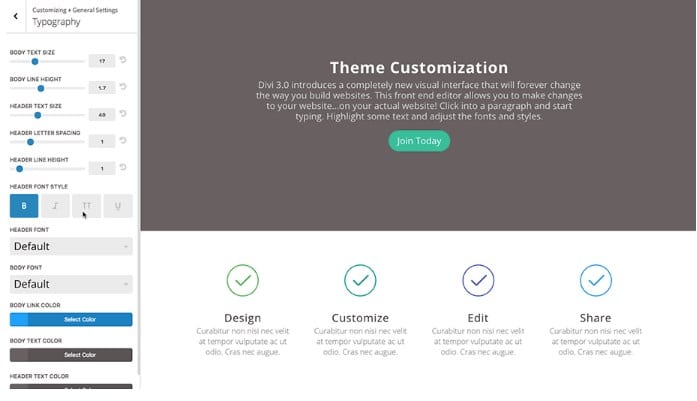
The Divi Theme Customizer screenshot above illustrates adjusting global typography styles, color palettes, and header layouts visually.
Divi provides 40+ content modules including pricing tables, call-to-action buttons, testimonial sliders, portfolio grids, and opt-in forms. Webmasters drag and drop modules into custom multi-column row layouts effortlessly.
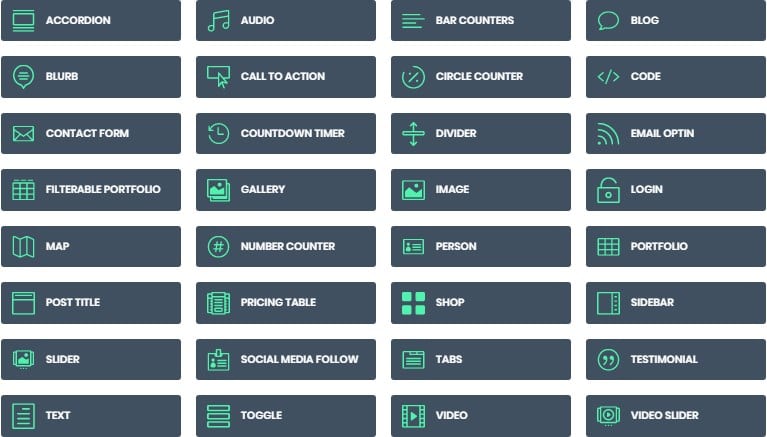
The Divi builder options graphic above demonstrates customizing individual module spacing, animation effects, and hover state triggers.
Divi features responsive editing controls, allowing webmasters to adjust column widths, text sizes, and padding values specifically for mobile and tablet viewports.
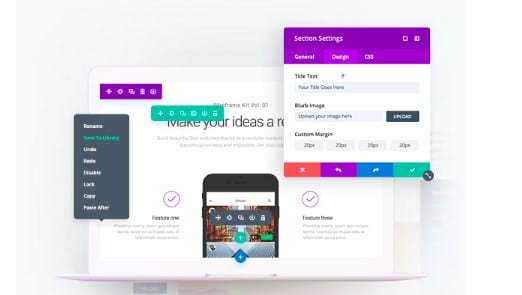
The Divi visual site builder screenshot above highlights live inline text editing and real-time element drag-and-drop mechanics.
Divi includes built-in A/B split testing (Divi Leads), allowing site owners to test alternate headlines, button colors, and page layouts to maximize conversion rates scientifically.
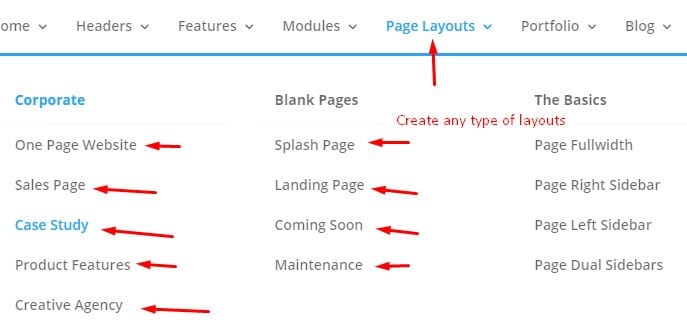
The Divi layout pack library visual above showcases importing complete pre-built website page sets instantly.
Divi includes Theme Builder functionality, enabling webmasters to design custom header navigation menus, global post templates, archive pages, and WooCommerce product layouts visually.
The Divi navigation settings graphic above demonstrates configuring mega-menus, sticky headers, and mobile navigation styles.
Divi integrates built-in ad placement settings and widget management panels, allowing publishers to monetize site content easily.
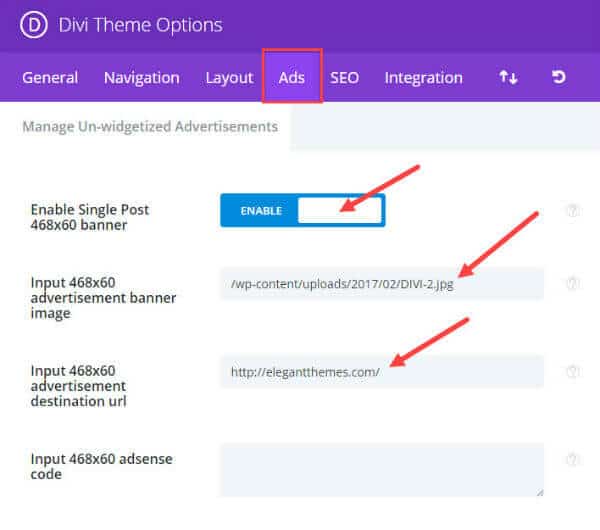
The Divi ad settings interface visual above highlights inserting banner ads and Google AdSense scripts into post layouts.
Divi includes advanced design styling controls including box shadows, background gradients, blend modes, and dynamic colorization settings.
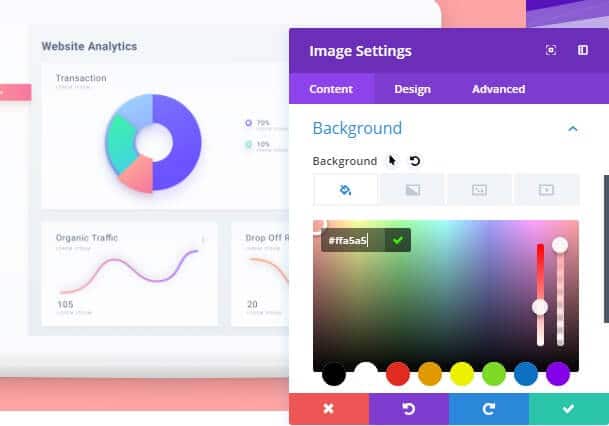
The Divi colorization graphic above shows managing global color palettes and dynamic design tokens across your website.
To optimize Divi loading speeds, site owners should install caching optimizations reviewed in our guide on best cache plugins for Divi. Read our detailed Elegant Themes review for broader ecosystem evaluation.
To maximize Divi server response times on budget infrastructure, review our performance-tested BloggersNeed cheap web hosting guide for high-speed providers.
Divi Theme Speed Benchmarks & Core Web Vitals Performance
Historically criticized for heavy shortcode output, modern Divi releases feature complete performance overhauls that dynamic-trim unused CSS and JavaScript. Review how Divi performs under performance speed testing tools.
Divi’s Performance Options engine automatically defers Gutenberg stylesheet rendering, defers jQuery scripts, and generates critical inline CSS styles for above-the-fold content.
Testing a clean Divi installation on fast cloud hosting yields impressive GTmetrix scores: 98% Performance Score, 900 ms Largest Contentful Paint (LCP), and 0 ms Total Blocking Time (TBT).
Combining Divi’s built-in performance toggles with a global CDN and server caching guarantees passing Google Core Web Vitals assessments easily.
Divi Theme vs Elementor Pro: Detailed Feature Comparison
Comparing Divi against Elementor Pro clarifies key visual builder differences for agency developers and site builders. Review the core comparison points below.
| Feature Comparison | Divi Theme & Builder | Elementor Pro |
|---|---|---|
| Product Type | Complete Theme + Standalone Builder Plugin | Standalone Builder Plugin (Requires Theme) |
| Entry Annual Price | $89 / year | $59 / year |
| Website License Limit | Unlimited Websites Included | 1 Website ($59) / 25 Websites ($199) |
| Lifetime License Option | Yes ($249 One-Time Payment) | No (Annual Subscription Only) |
| Built-in Split Testing | Native Divi Leads Tool Included | Requires Third-Party Add-on |
| Pre-built Website Packs | 2,000+ Complete Layout Packs | 300+ Designer Templates |
| Full WooCommerce Builder | Included (Dynamic Product Modules) | Included (Custom WooCommerce Widgets) |
Licensing & Value: Divi wins decisively on pricing by offering a $249 Lifetime Access plan for unlimited websites. Elementor Pro charges recurring annual subscription fees per website tier ($59/yr for 1 site, $199/yr for 25 sites).
Visual Builder Speed: Elementor Pro provides slightly faster backend editing response times on complex pages, while Divi’s front-end builder offers superior inline text formatting controls.
Ecosystem & Add-ons: Both themes support extensive third-party plugin marketplaces, but Divi’s native Theme Builder includes built-in A/B testing without requiring external third-party tools.
Divi Theme WooCommerce Integration & Store Building
Divi integrates natively with WooCommerce, providing custom Woo modules for product galleries, add-to-cart buttons, and star rating displays. Store owners can design custom checkout pages and product layouts visually without writing PHP template files.
Utilizing Divi’s dynamic content features allows fetching product titles, prices, and stock statuses automatically into custom catalog grids, streamlining ecommerce store design.
Divi Marketplace & Third-Party Child Themes
The official Divi Marketplace features thousands of third-party child themes, custom extensions, and specialized layout modules built by independent developers. Webmasters can expand Divi’s functionality with custom carousel plugins, mobile menu enhancements, and pop-up builders.
Purchasing verified marketplace extensions guarantees compatibility with core Divi theme updates, giving agencies access to unlimited design resources.
Divi Theme Security & Code Standards Audit
Divi code releases undergo rigorous security audits conducted by third-party cybersecurity firms like Sucuri. Elegant Themes maintains strict coding standards to ensure theme updates contain zero security vulnerabilities.
Utilizing automatic background updates ensures your Divi installations retain all security patches and performance improvements continuously.
Divi Cloud & Global Asset Management Workflows
Divi Cloud allows webmasters to save custom layout designs, section templates, and module styles into a cloud library accessible across all client sites. Accessing your cloud library directly from the visual builder accelerates website build times significantly.
Agencies building multiple client sites store branded header templates and footer layouts inside Divi Cloud, deploying consistent design systems across client projects effortlessly.
Divi Cloud synchronization ensures that team members collaborate seamlessly on client projects without needing to manual export JSON layout files.
Who Should Buy Divi Theme? (Target User Persona)
Divi is ideal for web design agencies, freelance site builders, and non-technical business owners seeking total design freedom without annual licensing costs. Its lifetime licensing option provides unmatched long-term ROI for multi-site managers.
Developers needing fast turn-around times on client builds benefit from Divi’s 2,000+ pre-built layout packs, while agency owners appreciate the built-in white labeling and role editor features.
Divi Theme Pricing Tiers & Lifetime License Value
Elegant Themes provides two straightforward pricing options enabling complete access to Divi, Extra, Bloom, and Monarch plugins. Review the pricing comparison below.
- Yearly Access ($89 / year): Grants full access to Divi, Extra, Bloom, and Monarch on unlimited website installations with 1 year of support and updates.
- Lifetime Access ($249 one-time): Grants lifetime access to Divi, Extra, Bloom, and Monarch on unlimited personal and client websites with lifetime support and updates.
The Lifetime Access plan represents one of the best values in the WordPress industry, enabling agencies to build unlimited client sites without ongoing annual licensing costs.
Divi Theme Pros and Cons Breakdown
Evaluating Divi’s major advantages and potential drawbacks ensures you select the right page builder for your project needs. Review the pros and cons summary below.
Divi Pros:
- Intuitive drag-and-drop front-end Visual Builder interface with real-time editing.
- Massive library of 2,000+ pre-built layout packs with 1-click demo import.
- Lifetime Access license allowing unlimited site usage for personal and client projects.
- Built-in Divi Leads A/B split testing engine to optimize conversion rates.
- Complete Theme Builder system to design headers, footers, and WooCommerce post templates.
Divi Cons:
- Shortcode dependency means deactivating Divi leaves shortcode markup in database content.
- Steep learning curve for absolute beginners due to the vast array of design options.
- Requires speed optimization plugins (like WP Rocket) to achieve top Core Web Vitals scores.
Frequently Asked Questions About Divi Theme
Evaluating Divi Theme requires examining licensing limits, performance optimizations, and ease of use for content creators and agencies. The answers below explain unlimited website activations, beginner workflow learning curves, and Core Web Vitals speed optimization techniques.
Is Divi Theme good for beginners?
Yes, Divi Theme is highly beginner-friendly due to its visual front-end drag-and-drop builder, inline text editing, and over 2,000 pre-designed website layout templates. New site builders can design responsive pages visually without writing HTML, CSS, or PHP code.
Yes, Divi is beginner-friendly due to its visual drag-and-drop front-end builder and 2,000+ pre-built layout templates that eliminate the need to write code.
Can I use Divi on unlimited client websites?
Yes, both the Elegant Themes Yearly Access and Lifetime Access licenses permit installing and activating Divi across unlimited personal and client websites without extra per-site licensing fees. This unlimited activation model makes Divi exceptionally cost-effective for freelance designers and digital marketing agencies.
Yes. Both the Yearly Access ($89/yr) and Lifetime Access ($249) licenses permit using Divi across unlimited personal and commercial client websites.
Is Divi fast enough for Google Core Web Vitals?
Yes, modern versions of Divi achieve passing Google Core Web Vitals scores when paired with quality cloud hosting, dynamic CSS trimming, and page caching plugins. Elegant Themes automatically defers non-critical CSS scripts, unneeded icons, and JavaScript to deliver sub-second Largest Contentful Paint times.
Yes. Modern Divi releases include dynamic CSS trimming and critical CSS generation. Pairing Divi with top caching plugins ensures fast page load speeds and passing Core Web Vitals scores.

I’m Abdullah Prem, a passionate blogger with over 10 years of experience. I created BloggersNeed to produce high-quality, easy-to-understand articles, guides, and tutorials that help people start their blogging journey. Specializing in WordPress, Hosting, Themes, and online money-making strategies, I’ve been featured on leading tech platforms such as Tech.co, Cloudways, Business2Community, Leadpages, GoodFirms, and ShareThis. BloggersNeed.com
I think its a really best theme in the market and having all types of theme packages available. The support and uniqueness in every theme in divi themes is really very very impressive. Thanks a lot for sharing this amazing article. So helpful for me. Keep it up